
A Magento store is a complex ecosystem where high-performance e-commerce features often collide with technical constraints. When your organic rankings stall or your site speed lags, the culprit is rarely just “bad keywords.”
Instead, it is often buried deep within the codebase. Performing a magento code audit for better SEO allows you to bridge the gap between developer logic and search engine visibility, ensuring that your technical foundation supports rather than hinders your marketing efforts.
Because Magento is a highly modular and flexible platform, it is easy for “code rot” to set in. Over time, customizations, third-party integrations, and database bloat can create a heavy technical debt that weighs down your search performance. This guide provides a comprehensive framework for auditing your code to reclaim your rankings.
When a Magento SEO code audit is necessary
Not every performance dip requires a full-scale code review, but certain red flags indicate that Magento technical issues are rooted in the site’s architecture. Recognizing these signs early can save months of wasted marketing spend.
Traffic drops after deployment
If you notice a sharp decline in organic traffic immediately following a new feature release or a version upgrade, it is a sign that new code may have broken canonical logic, altered header tags, or introduced crawl blocks. A code audit helps trace these changes back to specific commits.
In many cases, a simple change in the config.xml or a layout override can accidentally set a “noindex” tag across an entire category branch.
Poor core web vitals
Google’s Core Web Vitals (LCP, FID, and CLS) are directly influenced by how your code is structured. If your “Largest Contentful Paint” is consistently in the red, the issue likely lies in how Magento handles image loading, JavaScript execution, or server-side rendering – all of which require a focused page speed optimization strategy for Magento stores.
Unlike general content issues, these are purely structural problems that require a developer’s intervention to solve.
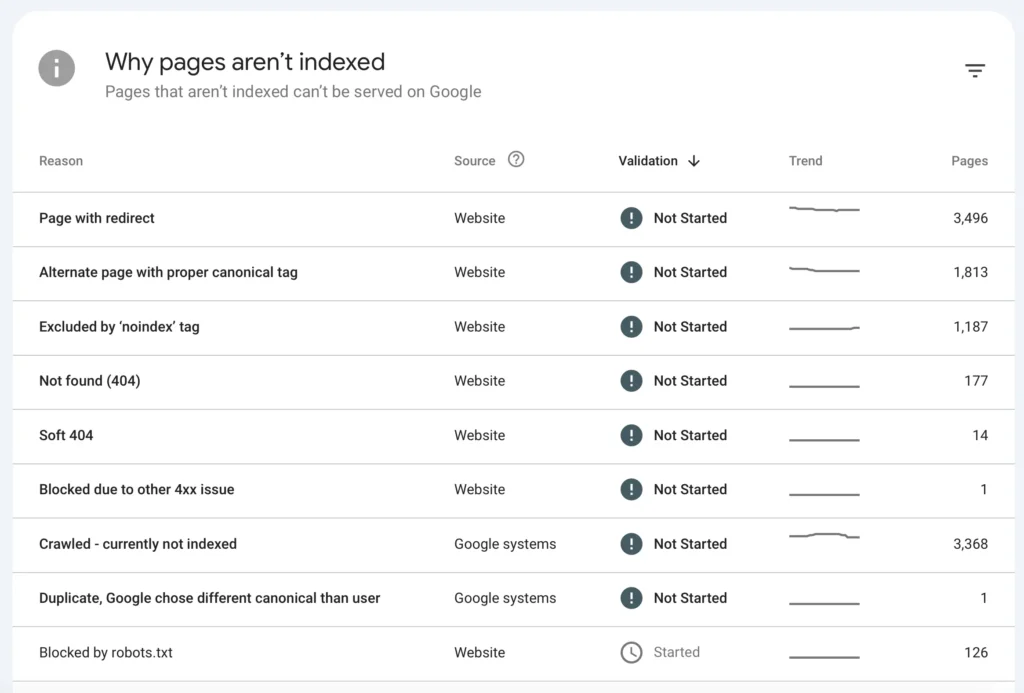
Index bloat or crawl issues
When Googlebot spends its “crawl budget” on thousands of low-value, duplicate, or filtered pages, your high-priority product pages suffer. This usually happens because of poorly coded layered navigation or parameter handling that creates an infinite number of indexable URLs.
If your Google Search Console shows a massive discrepancy between “Discovered” and “Indexed” pages, your backend logic is likely at fault.
Slow category or product pages
Magento is notorious for its resource-intensive nature. If your category pages take more than three seconds to load, it is often due to inefficient backend collections or “N+1” query problems where the code fetches data one item at a time instead of in a single batch.
This slow response time increases the Time to First Byte (TTFB), which is a known ranking signal.
Note: Category and product pages are often image-heavy, making them prime candidates for optimization. Leveraging Magento 2 image optimization techniques can dramatically improve load time and scrolling performance on these revenue-driving pages.
Prepare for a Magento SEO-focused code audit
Preparation is the difference between a list of random bugs and a strategic SEO roadmap. You must align your technical investigation with your business objectives to ensure the audit provides actionable value.
Define SEO goals before auditing code
Before opening a single file, you must identify which SEO KPIs you are trying to move. Auditing code without a goal is like searching for a needle in a haystack without knowing what a needle looks like.
Identify SEO KPIs to improve:
- LCP (Largest Contentful Paint): Target the loading of the main product image or banner.
- CLS (Cumulative Layout Shift): Target visual stability during page load.
- Index Coverage: Target the reduction of “Excluded” pages in Search Console.
- Rankings: Target the clarity of on-page signals through clean HTML.
Decide audit scope:
- Frontend code: Reviewing the theme, CSS, and JavaScript delivery mechanisms.
- Backend logic: Inspecting controllers, observers, and models that generate URLs and metadata.
- Third-party extensions: Analyzing how external plugins interact with the core Magento SEO features.
- Custom themes: Checking if overrides have inadvertently removed standard SEO features like schema markup or breadcrumbs.
Set up tools for code and SEO analysis
A successful audit requires a “dual-lens” approach: seeing the site as a developer and as a search crawler. You need tools that can “sniff” the code while others “crawl” the output.
Magento-specific tools:
- Static Analysis: Use PHPStan or Magento Extension Quality Program (EQP) to check for coding standards.
- Logs: Review exception.log and system.log to find hidden errors that slow down page generation.
- Profiler: Enable the Magento Built-in Profiler to see which blocks of code are taking the most time to execute.
- Magerun: Use n98-magerun2 to quickly check configuration settings and database integrity.
SEO and performance tools:
- Page speed and rendering analysis: Google PageSpeed Insights, Lighthouse, and WebPageTest.
- Crawl and indexation diagnostics: Screaming Frog, Sitebulb, or Botify to visualize the URL architecture.
Why combining developer tools and SEO tools is critical SEO tools tell you what is wrong (e.g., “slow TTFB”), while developer tools tell you why it is wrong (e.g., “inefficient database query in the header block”).
For example, an SEO crawler might flag a duplicate content issue, but only a code audit will reveal that a custom observer is failing to inject the correct canonical URL into the page head.
Audit Magento frontend code that impacts SEO
The frontend is the “face” of your website to both users and Google. If the frontend code is inefficient, search engines may struggle to render your content accurately, leading to poor rankings even if your keywords are perfect.
Review page rendering and JavaScript execution
- Why it matters: Excessive JavaScript blocks the browser from showing content to the user. This delays First Contentful Paint (FCP) and Largest Contentful Paint (LCP). If Googlebot times out before your JS executes, it may see a blank page or a page missing critical navigation links.
- Direction: Analyze the pub/static folder and your theme’s requirejs-config.js. Look for heavy libraries (like jQuery UI or outdated slider scripts) being loaded on pages where they aren’t used. Check the size of the “bundles” being sent to the browser.
- How to fix: Implement “Advanced Bundling” or transition to a modern frontend like Hyvä to reduce JS payload. Use the defer or async attributes for non-critical scripts. Ensure that the main product description and price are rendered in the initial HTML response (Server-Side Rendering) so bots don’t have to wait for JS.
Analyze CSS and layout code
- Why it matters: Unused CSS increases page weight, while late-loading styles cause layout shifts. A high Cumulative Layout Shift (CLS) score signals a poor user experience, which Google penalizes. In Magento, many themes load a massive styles-m.css and styles-l.css that contain styles for components not even present on the current page.
- Direction: Use the “Coverage” tab in Chrome DevTools to find unused CSS. Check for images, banners, or ad blocks without defined dimensions in the HTML. Look for web fonts that cause “Flash of Unstyled Text” (FOUT).
- How to fix: Inline critical CSS required for the “above the fold” content and defer the rest. Assign explicit width and height attributes to all images and containers to reserve space before the asset loads. Use font-display: swap in your CSS to ensure text remains visible while fonts are downloading.
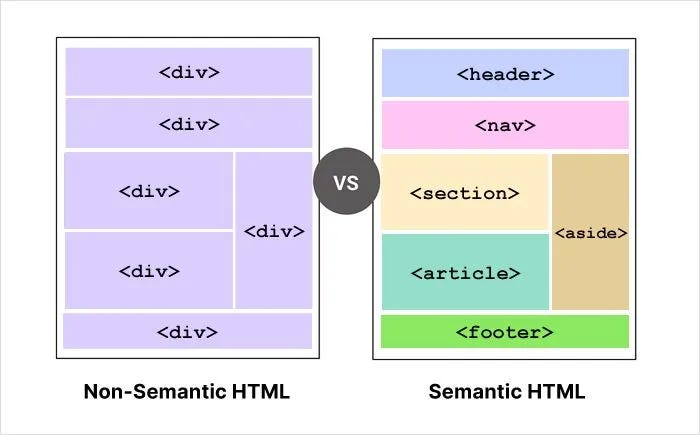
Evaluate HTML structure and semantic markup
- Why it matters: HTML provides the context for your content. If a product name is in a generic <div> instead of an <h1>, search engines may not understand the primary topic of the page. Furthermore, poor markup can hinder accessibility, which is an increasingly important factor in how Google evaluates site quality.
- Direction: Audit your .phtml templates. Ensure H1 tags are unique and that the heading hierarchy (H1 -> H2 -> H3) is logical and not used for styling purposes. Check for the presence of Schema.org structured data (JSON-LD) in the source code.
- How to fix: Rewrite template files to use semantic HTML5 tags (like <nav>, <article>, and <footer>). Ensure that breadcrumbs are wrapped in proper microdata. Remove any hidden “SEO text” that is only visible to bots, as this can lead to cloaking penalties. Ensure all images have meaningful alt attributes generated from the product name.
Audit Magento backend code and logic
While the frontend is about speed and structure, the backend determines how your site is indexed and discovered. This is where the most complex Magento technical issues usually reside.
Check routing, URLs, and canonical logic
- Why it matters: Magento’s default URL rewrites can sometimes create duplicate paths to the same product (e.g., via different categories). If the canonical logic in your code is flawed or missing, search engines won’t know which version to rank, diluting your “link juice.”
- Direction: Review the UrlRewrite module and any custom extensions that modify URL structures. Check if canonical tags are pointing to the correct “source of truth,” especially on pages with filters (layered navigation). Ensure that trailing slashes are handled consistently.
- How to fix: Ensure your code automatically generates a canonical tag for every URL. If you use layered navigation, ensure the code adds a rel=”canonical” to the base category page rather than the filtered result. Audit the sitemap.xml generation logic to ensure it only includes the preferred canonical URLs.
Review indexing and robots control logic
- Why it matters: Incorrect robots.txt or meta robots tags can accidentally de-index your entire site or allow the indexing of sensitive checkout pages, leading to “index bloat.” This wastes crawl budget and can expose private customer paths to search results.
- Direction: Inspect the head.phtml or the layout XML files where meta tags are generated. Look for logic errors in your custom modules that might apply a noindex tag to live products when they are out of stock. Check your robots.txt configuration in the Magento Admin and ensure it matches the actual site structure.
- How to fix: Use a dedicated SEO module or custom code to allow granular control over meta robots tags at the product and category levels. Ensure the robots.txt is dynamic and correctly excludes /customer/, /checkout/, and /catalogsearch/. Prevent the indexing of session IDs (?SID=) and other non-content parameters.
Analyze database queries and performance bottlenecks
- Why it matters: High Time to First Byte (TTFB) is often caused by the backend taking too long to process data. If the server takes 2 seconds just to start sending the page, your SEO rankings will suffer. Slow queries are the “silent killer” of Magento SEO.
- Direction: Use a tool like New Relic or the Magento Profiler to find “slow queries.” Look for loops that call the database inside a template file (a common Magento anti-pattern known as the N+1 problem). Check if the flat_catalog is enabled or disabled (Magento now recommends disabling it, but your code must be optimized for EAV).
- How to fix: Move data fetching logic from .phtml templates to View Models or Blocks. Implement advanced caching strategies (Redis for sessions and backend cache, Varnish for Full Page Cache). Ensure that all searchable attributes are properly indexed in the database and that the cron jobs are running correctly to keep those indexes fresh.
Review Magento extensions from an SEO perspective
Extensions are the double-edged sword of Magento. While they add functionality, they are often the primary source of performance degradation and code conflicts.
Identify extension-related SEO risks
- Why it matters: Some extensions might inject their own metadata, overwriting your carefully crafted SEO titles. Others might add heavy tracking scripts or “chat bots” site-wide without conditions, adding seconds to your page load time even on pages where the tool isn’t needed.
- Direction: Disable extensions one by one in a staging environment and run speed tests. Check the source code to see if multiple title or description tags are appearing. Look for “hidden” requests to external APIs that might be hanging and slowing down the page render.
- How to fix: Audit the layout.xml of each extension to see where it is injecting code. Use the “defer” attribute for extension scripts so they don’t block the main thread. If an extension is injecting poor meta tags, use a plugin or observer to override its output and restore your SEO settings.
Evaluate custom vs third-party code quality
- Why it matters: Custom code built by inexperienced developers often lacks the “defensive” optimizations found in reputable third-party modules. Conversely, “bloated” third-party modules can add hundreds of unnecessary features that load on every page, hurting your core web vitals.
- Direction: Compare the performance of a custom-built feature against a well-known industry standard. Use a code sniffer to check for “spaghetti code” or deprecated Magento functions in custom modules.
- How to fix: If an extension is causing more SEO harm than good, decide whether to refactor the code (fix the bugs) or remove it entirely in favor of a native Magento feature or a lighter alternative. Always prioritize “lean” modules that follow Magento’s service contracts and coding standards.
Best practices when implementing Magento code audit
The audit is only the first step. The implementation of your findings is where the actual SEO growth happens. Following a structured process ensures that your fixes are stable and effective.
- Validate SEO-critical technical outputs: After every code change, do not just check if the site “looks” right. Always check the rendered HTML. Use “View Source” to ensure tags like rel=”canonical”, hreflang, and Schema markup are still present and accurate.
- Map code issues to SEO impact: Not all bugs are equal. Categorize findings into “High Impact” (e.g., broken indexation, slow TTFB) and “Low Impact” (e.g., missing alt text on a footer icon). This helps developers prioritize the tasks that will move the needle the most.
- Create a fix roadmap for developers: Developers are not always SEO experts. Provide clear, technical instructions, including the file paths and the specific lines of code that need adjustment. Use a ticketing system like Jira to track each fix from development to testing to production.
- Test in a staging environment: Never push code changes directly to production. Use a staging site that mirrors your production environment to run Lighthouse reports and crawl tests. This ensures that a “fix” for LCP doesn’t accidentally break your checkout flow.
- Monitor Search Console post-fix: Once the code is deployed, use the “URL Inspection Tool” in Search Console to ask Google to recrawl the affected pages. Monitor the “Core Web Vitals” report over the following weeks to verify that your metrics are moving into the “Green” zone.
- Document everything: Keep a log of what was changed and why. Magento updates can sometimes overwrite custom fixes if they weren’t implemented via the proper plugin/preference system. Documentation ensures that your SEO optimizations survive the next platform upgrade.
Conclusion
A magento code audit for better SEO is an ongoing process rather than a one-time task. As you update your Magento version, add new extensions, or change your theme, new technical bottlenecks can emerge. The goal is to create a culture of “SEO-first development,” where every piece of code is written with performance and crawlability in mind.
By consistently auditing your frontend performance, backend logic, and third-party modules, you ensure that your site remains fast, crawlable, and competitive in search rankings. In the world of high-stakes e-commerce, technical excellence is the foundation upon which all other marketing efforts are built. Without a clean codebase, even the best content will struggle to reach its full potential.