
The success of a Magento e-commerce store is often measured by its conversion rate, but conversion is the final step in a journey that begins with discovery. Product discovery is the process by which a customer finds what they need—or discovers what they didn’t know they wanted—within your catalog.
While many merchants focus heavily on search bar optimization, the foundational architecture of your categories often plays a more significant role in how easily products are found.
Why Category Architecture Is the Foundation of Product Discovery in Magento
In Magento, the category hierarchy is the backbone of the storefront. It dictates the primary navigation menu, the breadcrumb trails, and the URL structure. When a user lands on your homepage, the category labels are their first map of your inventory. If that map is confusing, the user journey ends before it begins.
How Magento’s category hierarchy controls what users see
Magento uses a tree structure for categories. The root category acts as the container for the entire store, while subcategories branch out to define specific product groupings. This hierarchy controls the top navigation menu. If a product is nested four levels deep but the menu only displays two levels, that product becomes effectively invisible to a browsing user.
Furthermore, Magento’s anchor setting for categories determines whether products in subcategories are rolled up into the parent view, directly affecting how much variety a user sees at any given point. Without a strategic hierarchy, your store becomes a labyrinth where even high-demand products remain hidden from the very customers looking for them.
Read more: Magento navigation optimization best practices
The relationship between category depth, navigation clarity, and discoverability
There is a direct correlation between how many clicks it takes to reach a product and the likelihood of a sale. However, flat isn’t always better. A category structure that is too shallow forces too many products into a single view, leading to choice paralysis. Conversely, extreme depth creates click fatigue.
Discovery thrives when the user feels a sense of progression. Each click should act as a filter, narrowing down the world of possibilities until the user is presented with a curated selection of relevant items. The goal of architecture is to balance depth and breadth so that each click provides a meaningful refinement of the user’s intent without overwhelming their cognitive load.
Why product discovery issues are often structural
Merchants often mistake discovery problems for search problems. If a user searches for “summer dresses” and gets no results, that is a search issue. However, if a user clicks on “Women” and then “Clothing” but cannot find a logical path to “Dresses,” that is a structural failure.
Search is a surgical tool, often used by users who already know exactly what they want. Browsing, however, is an exploratory behavior. If the structure is broken, users cannot explore, and your store loses the opportunity to facilitate impulse buys or cross-category discoveries.
Common signs of poor category architecture
- High bounce rates on category pages: Users land on a list and immediately leave because the products aren’t relevant to the category label or the layout is overwhelming.
- Hidden products: High-margin items that receive zero impressions because they are buried in obscure subcategories that no user ever reaches.
- Over-filtering: Users are forced to apply five or more filters just to see a manageable number of items because the parent category is too broad.
- Low pages per session: A sign that the navigation does not encourage movement through the site or that the “scent of information” is lost as the user clicks deeper.
How Magento Category Architecture Influences Product Discovery Paths
Understanding how users navigate a Magento store is essential for optimizing the architecture. Most users follow a predictable path: Global Navigation → Category Page → Layered Navigation (Filters) → Product Detail Page (PDP).
Read more: SEO-Friendly Product Filtering vs User Experience in Magento Stores
How users actually discover products in Magento
The journey typically begins at the top-level menu. In Magento, this menu is generated dynamically based on your category tree. If the menu is cluttered with thirty different items, the user’s eye skips over the options.
Once a user enters a category, the ‘Layered Navigation’ (sidebar filters) becomes the primary discovery engine.
While Magento provides native filtering, many high-growth stores implement a Magento 2 Layered Navigation extension to offer more advanced features like AJAX loading, multi-select filters, and improved mobile UX.
Regardless of the tool used, the architecture must be built to support this handoff from the menu to the filters seamlessly.
The role of parent vs. child categories in discovery flow
Parent categories should represent broad intent (e.g., “Kitchen Appliances”), while child categories represent specific needs (e.g., “Blenders”). In Magento, the parent category serves as a landing page that sets the context.
If the parent category is set as an anchor, it allows users to see all products within the branch, which is vital for discovery. It allows a user who is “just looking for a kitchen tool” to see a wide variety before they decide to narrow their focus to a specific sub-type.
Impact of flat vs. deep category hierarchies on browsing behavior
- Flat hierarchies (Broad): These are ideal for stores with smaller catalogs (under 1,000 SKUs). They keep products close to the surface, reducing the “clicks to product” metric. However, they can lead to massive category pages that require significant scrolling.
- Deep hierarchies (Granular): Necessary for massive catalogs (50,000+ SKUs). They allow for extreme precision, but if they are too deep, they risk burying items. In a deep hierarchy, breadcrumbs become essential discovery tools, allowing users to “pivot” back to a higher level of the tree easily.
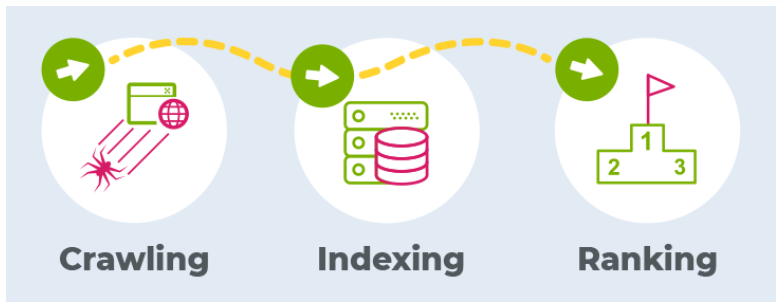
How category structure affects internal linking and crawl paths
For search engines and users alike, the category structure creates a web of internal links. A logical hierarchy ensures that link equity flows from the high-authority homepage down to individual product pages.
If a category is not linked in the main menu or a sidebar, it becomes an “orphan” page. Orphan pages are rarely indexed by Google and are almost never discovered by users, effectively deleting those products from your digital shelf.
Common Magento Category Architecture Mistakes That Hurt Product Discovery
Even experienced Magento developers often fall into traps that hinder discovery. Recognizing these errors is the first step toward optimization.
Over-nested categories that hide products too deep
A common mistake is creating a hierarchy that is five or six levels deep. For example: Home > Furniture > Living Room > Seating > Sofas > Leather Sofas > 3-Seater Leather Sofas. By the time the user reaches the final level, they have clicked six times. Data shows that user abandonment increases exponentially with every click.
In most cases, attributes (filters) like “Size” or “Material” should handle the lower levels of this hierarchy rather than dedicated categories.
Duplicate or overlapping categories creating confusion
When a store has “Summer Collection” and “Dresses” as top-level categories, and both contain the same products, users become confused about where to find specific items.
While Magento allows a product to live in multiple categories, having too many overlapping paths can dilute the user’s focus and split your SEO authority across multiple identical pages.

Categories built around internal logic instead of user intent
Retailers often build categories based on how their warehouse is organized, their supplier lists, or how their ERP (Enterprise Resource Planning) labels items.
A user does not search for “SKU Group 402” or “Supplier X Collection”; they search for “Running Shoes.” Architecture must speak the language of the customer, using terms they actually use in their daily lives.
Poor alignment between categories, attributes, and layered navigation
If a user clicks on “Hiking Boots” but the sidebar filters are still showing “Heel Height” and “Formal Style,” the discovery path is broken. This mismatch usually occurs when merchants fail to use specific Attribute Sets for different categories. This leads to a cluttered sidebar that provides no value to the shopper.
Best Practices and Implementation for Magento Category Architecture
Optimizing category architecture requires a transition from a database mindset to a shopper mindset. This involves aligning your technical configuration with customer intent to create a path of least resistance while ensuring technical and SEO considerations are met.
Designing around customer intent
Analyze your search query data and customer behavior. If users frequently search for “Sustainable Materials,” consider making “Sustainability” a high-level category or a prominent subcategory. The goal is to choose a category depth that matches your catalog size:
- Small catalogs (Under 500 SKUs): Maintain 1–2 levels.
- Medium catalogs (500–5,000 SKUs): Use 2–3 levels.
- Large catalogs (5,000+ SKUs): Utilize 3–4 levels, heavily supplemented by dynamic layered navigation.
Technical configuration and layered navigation
In Magento, categories and filters work in tandem. Categories define the “where,” while filters define the “what.”
- Configuring anchor categories: Navigate to Catalog > Categories > [Select Category] > Display Settings and set Anchor to Yes. This is the single most important setting for discovery, as it enables the layered navigation sidebar.
- Managing filterable attributes: Go to Stores > Attributes > Product. Set Use in Layered Navigation to Filterable (with results). This ensures that a filter only appears if there are actual products to show, preventing the dreaded “no products found” result.
- Filter relevance and usability: If a user is in the “Shoes” category, they should see filters for “Size” and “Color.” If they are in “Laptops,” they should see “RAM” and “Processor.” Ensure attributes are correctly assigned to Attribute Sets to avoid showing “Thread Count” in a “Tools” category.
- Category-specific attributes: Magento allows you to define which attributes are “filterable” in the layered navigation. Ensure that when a user enters a specific subcategory, filters dynamically update to show only what is relevant.
SEO considerations when optimizing category architecture
Your category structure is the primary way Google understands your site’s topical relevance.
- Crawlability and indexation: A clean hierarchy with a logical URL structure (e.g., store.com/men/shoes/boots) helps search engines index your pages more efficiently. Avoid “flat” URLs for deep structures as they hide the relationship between parent and child pages.
- Internal linking benefits: Use your category pages to link to related subcategories or “shop by brand” pages. This keeps users on the site longer and helps search bots discover new content.
- Avoiding cannibalization: If you have a category for “Red Dresses” and an attribute filter for “Color: Red” applied to a “Dresses” category, use Canonical Tags to tell Google which page is the “master” version to avoid duplicate content penalties.
Measuring the impact of category architecture
Use Google Analytics 4 (GA4) and Magento’s native reports to track metrics that signal discovery success:
- Category Page Exit Rate: High rates suggest the category is poorly labeled or the product mix is wrong.
- Path Exploration: Observe if users go deeper into subcategories or retreat to the search bar. This tells you if your category labels are intuitive.
- Product Views from Category: The ratio of category views to product detail page views. A low ratio suggests the architecture isn’t helping users find the right product.
Structuring Magento Categories to Support Layered Navigation and Filters
Layered navigation is the engine of discovery once the user has selected a category. If your category structure is the “aisle” of a store, layered navigation is the “clerk” helping the customer find their exact size and color.
How category architecture impacts filter relevance
When a category is set as an “Anchor,” Magento looks at all products within that category and its subcategories to determine which filters to show. If your categories are organized haphazardly, your filters will be too.
For example, if “Tents” and “Sleeping Bags” are in the same parent category and that parent is anchored, the sidebar may show both “Capacity” (for tents) and “Temperature Rating” (for sleeping bags), cluttering the discovery path.
Ensuring attributes are discoverable
Filters should be ordered by importance. In most categories, “Price” and “Brand” are the most used filters. Magento allows you to set the “Position” of attributes.
By placing the most relevant discovery attributes at the top, you reduce the effort required for a user to find what they need.
Category-specific attributes vs. global attributes
While some attributes are global (like “Price” or “Color”), others are highly specific. Use Magento’s Attribute Sets to ensure that specific categories only display relevant filters. This keeps the UI clean and ensures that the discovery process remains focused on the products at hand.
SEO Considerations When Optimizing Category Architecture
The way you structure your categories doesn’t just affect human users; it is the primary roadmap for search engine crawlers.
How category hierarchy affects crawlability
Search engine spiders have a “crawl budget.” If your category structure is a mess of circular links and deep nesting, the spider may leave before it reaches your actual products.
A clean, hierarchical structure ensures that the most important pages (your categories) are reached quickly and their authority is passed down to the products.
Category URLs, breadcrumbs, and canonical considerations
- URLs: Keep them descriptive. store.com/hiking-gear/boots is better than store.com/cat-id-45.
- Breadcrumbs: These are not just for users. They provide structured data (Schema) that helps Google display your site better in search results.
- Canonicals: When using layered navigation, Magento generates many unique URLs (e.g., ?color=red). Use the canonical tag to point back to the main category URL so you don’t get flagged for duplicate content.
Measuring the Impact of Category Architecture on Product Discovery
Optimization is an ongoing process. You must use data to validate your structural choices.
Key metrics that signal discovery success or failure
- Click-Through Rate (CTR) from Category to Product: If people are viewing category pages but never clicking a product, your architecture or your sorting logic is flawed.
- Search usage after category landing: If a user lands on a category page and immediately goes to the search bar, it means they couldn’t find a logical path through your navigation.
- Drop-off points: Identify which subcategories have the highest exit rates. These are your “dead ends” that need to be re-evaluated.
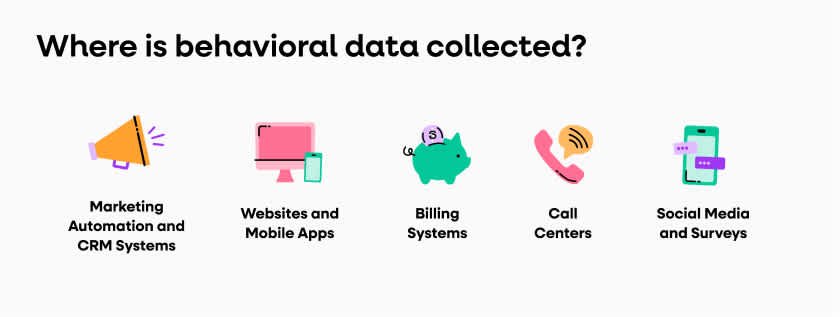
Using behavioral data to refine structures
Heatmaps can be incredibly useful. If you see that users are consistently clicking a specific attribute in the sidebar but that attribute is a subcategory in a different part of the tree, you may need to move that category or promote that attribute to a more prominent position.
When to Re-Architect Magento Categories vs. Optimize Incrementally
Changing your category structure is a major undertaking that can have significant SEO and UX consequences. It must be planned carefully.
Signs that a full category restructure is needed
If your store has undergone a major pivot in the products you sell, or if your current bounce rate across all category pages is consistently above 70%, it is likely that your fundamental architecture is no longer fit for purpose.
Another sign is “technical debt”—if your team finds it impossible to add new products because they don’t fit anywhere in the current tree, it’s time for a rebuild.
Low-risk optimization opportunities first
Before moving every category in your store, try these:
- Renaming: Sometimes a “Boots” category just needs to be renamed to “Winter Boots” to improve discovery.
- Re-sorting: Use the Magento Visual Merchandiser to put your best sellers at the top of the category page.
- Attribute cleanup: Removing unused or irrelevant filters from the sidebar can often have a bigger impact than moving the category itself.
Coordinating architecture changes
A category restructure involves three teams:
- UX Team: To ensure the new path is intuitive for humans.
- SEO Team: To manage 301 redirects and ensure organic traffic isn’t lost.
- Dev Team: To handle the backend migration and re-indexing.
Final Checklist for Optimizing Magento Category Architecture
Before finalizing any architectural changes, run through this validation list to ensure UX and SEO harmony:
- Category Depth Review: Is every product reachable within 3 to 4 clicks? If not, can some categories be converted into attributes?
- Product-to-Category Mapping: Is every product assigned to the most granular subcategory possible? Are they also showing up in the parent via the “Anchor” setting?
- Attribute and Filter Alignment: Does the sidebar update its options based on the specific category being viewed? Are the filters sorted by customer importance?
- UX and SEO Validation: Have you checked the mobile view for menu usability? Are all 301 redirects in place for deleted or moved categories?
- Ongoing Monitoring: Have you set up custom reports in GA4 to track the performance of your new categories?
By treating your Magento category architecture as a dynamic tool for discovery rather than a static filing system, you create a path of least resistance for your customers. This leads to higher engagement, better search engine rankings, and ultimately, a significant increase in sales.
Conclusion
In summary, optimizing your Magento category architecture is not a one-time task but a strategic necessity for sustainable growth.
By shifting from a static organizational structure to a dynamic, intent-driven discovery path, you directly reduce the friction between a customer’s need and your product solution.
Aligning clear hierarchies with robust layered navigation and technical SEO best practices ensures that your catalog is accessible to both human shoppers and search engine crawlers.
Continuous monitoring of behavioral metrics will allow you to refine this foundation, ensuring your store remains a high-converting, user-centric destination in an increasingly competitive e-commerce landscape.