
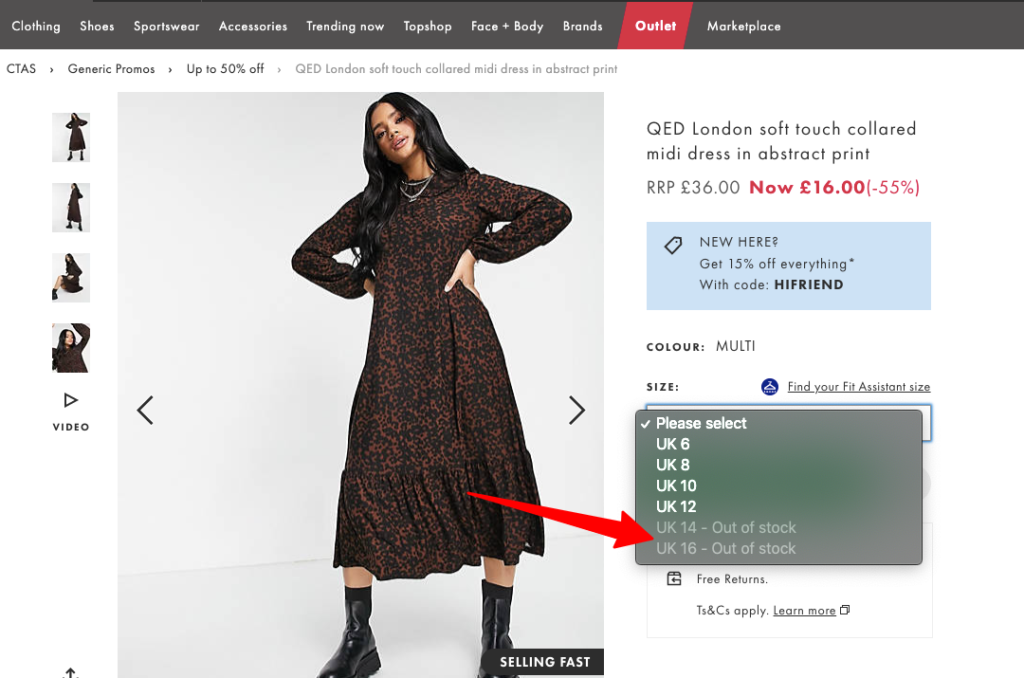
Managing inventory is one of the biggest challenges for any e-commerce business. In Magento, how you handle items that are no longer available can either strengthen your search rankings or lead to a significant drop in traffic.
Many store owners worry that keeping out-of-stock pages live will frustrate users, but deleting them haphazardly often results in broken links and lost SEO value.
This guide explores how to balance user experience with search engine optimization to ensure your store remains competitive and visible in search results.
Why out-of-stock product pages impact SEO
Every page on your Magento site represents an investment in crawl budget and link equity. When a product goes out of stock, that page doesn’t just lose its “Buy” button; it changes how search engines perceive the URL.
If handled poorly, these pages can create a “soft 404” environment where Google thinks the page is useless, even if it technically still loads.
Maintaining these pages correctly ensures that the authority built over time remains within your domain rather than evaporating into dead links.
How search engines treat unavailable products
Search engines like Google want to provide the best possible results for their users. If a user clicks on a search result only to find an unpurchasable product, it often leads to a high bounce rate.
However, search engines also understand that stock is fluid. If a page has historically ranked well, removing it immediately tells the search engine that the content is gone forever.
To avoid this, you should consult a Magento website audit checklist for 2026 to ensure your site architecture handles these status changes correctly across your entire catalog.
Key considerations for search engines include:
- The speed at which you update availability signals in your metadata.
- The presence of internal links pointing to the unavailable item.
- The quality of the alternative products suggested on the page.
- How the user interacts with the page once they realize the item is missing.
Temporary vs permanent stock issues
The approach you take depends entirely on whether the product is coming back. Temporary stock issues usually occur due to supply chain delays or high seasonal demand.
In these cases, the goal is to keep the page indexed and maintain its rank. You want to preserve the URL so that when stock returns, you don’t have to start from scratch.
Permanent stock issues, such as discontinued models or end-of-life electronics, require a different strategy involving redirects to maintain link equity and user flow.
Comparison of stock types:
- Temporary: Keep page live, show “back in stock” forms, and maintain all internal links.
- Seasonal: Keep the page live during the off-season, but perhaps move it out of the main navigation.
- Discontinued: Use 301 redirects to newer models or closely related categories.
- Limited Edition: Decide if the page serves as a “gallery” or “archive” after the sale ends.
Common SEO mistakes Magento stores make
Many Magento merchants make the mistake of automatically 404ing any page that hits zero inventory. This is one of the most frequent SEO issues in Magento stores because it kills the page’s authority instantly.
Another mistake is leaving the page exactly as it was, with no notification to the user or search engine. This confuses shoppers and can lead to lower brand trust.
Finally, some stores hide out-of-stock products from internal search but leave the direct URL active, creating “orphan pages” that are difficult for crawlers to find and update.
Common pitfalls to avoid:
- Deleting product images and descriptions while the page is still live.
- Failing to update the Schema.org availability tag to “OutOfStock.”
- Redirecting all out-of-stock items to the homepage, which dilutes relevancy.
- Ignoring the internal link equity that these older pages still provide to your categories.
Out-of-stock product pages: SEO-safe approaches in Magento
Implementing the right technical setup in Magento ensures that your store remains healthy even when inventory levels fluctuate.
By using the built-in settings and a few strategic adjustments, you can guide both users and bots toward the best possible outcome for your conversion rates.
Proper management ensures that an out-of-stock status is a minor speed bump rather than a total loss of traffic for your most popular items.
Keeping out-of-stock pages indexed with proper messaging
For items that will return to stock, the best SEO-safe approach is to keep the page live and indexed. You must change the user interface to reflect the situation immediately.
Instead of just showing “Out of Stock,” provide a clear “Back in Stock” notification form. This keeps the user engaged and provides a reason for them to stay.
From a search perspective, a live page with an email signup is far more valuable than a dead link. You can find more details on this strategy at https://bsscommerce.com/magento/blog/seo-with-out-of-stock-notification-for-magento-2/ to improve your customer retention.
Effective messaging elements:
- Clear, bold text stating the expected arrival date of the new shipment.
- A simple one-field email signup form to capture lead data.
- Recommendations for “Similar items you might like” to keep the shopping journey alive.
- Social proof or reviews that remain visible to keep the product’s value proposition clear.
When to use noindex, redirects, or removal
If a product is discontinued and has no direct replacement, a 301 redirect to the most relevant category page is often the best choice for your SEO.
This passes the link equity from the old product to the category level. If there is a newer version of the product, redirecting the old URL to the new model is superior.
Use a “noindex” tag only if you want to keep the page for existing customers but don’t want it appearing in public search results.
Decision matrix for page status:
- 301 Redirect: Use for discontinued items with a clear successor or a relevant category.
- Noindex: Use for products that are permanently gone but linked in customer order histories.
- Live (Index): Use for any product expected back within a reasonable timeframe (under 90 days).
- 404/410: Only use for products that never gained traffic and have no external backlinks.
Managing internal links and category visibility
Magento allows you to choose whether out-of-stock products show up in the category grid. For SEO, it is generally better to keep them visible but pushed to the bottom.
This ensures the internal link structure remains intact. If you hide the product entirely, the “path” to that product is broken, and Google may stop crawling it.
Keeping them at the end of the list maintains the SEO juice while ensuring that “In Stock” items get the most attention from your shoppers.
Benefits of keeping items in the category view:
- Maintains a consistent URL structure across the site’s pagination.
- Allows users who have “bookmarked” or “favorited” an item to still see its status.
- Prevents sudden changes in the number of products on a page, which can confuse crawlers.
- Provides an opportunity to cross-sell related products even if the main item is gone.
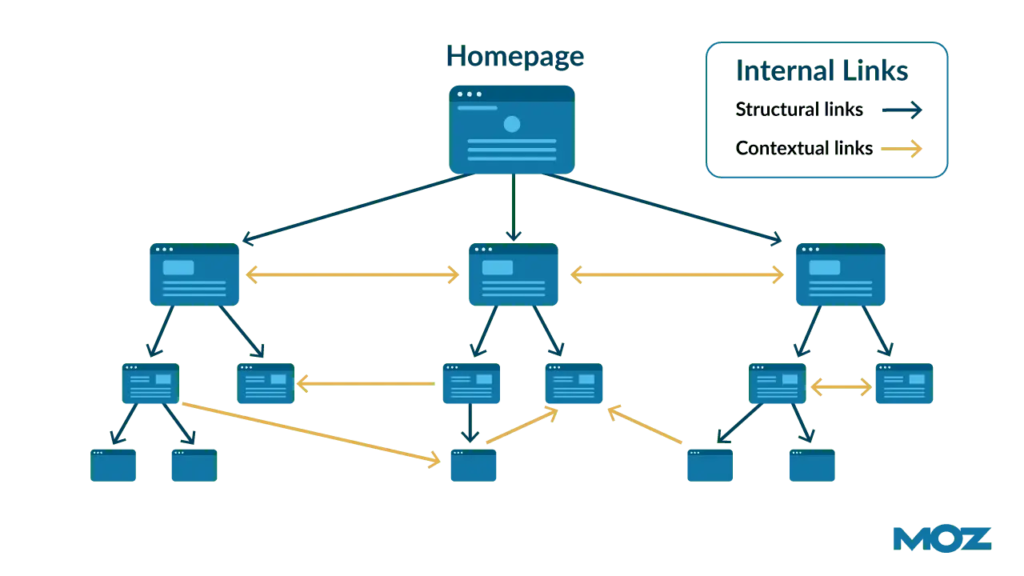
Updating structured data and product availability signals
One of the most important technical steps is updating your Schema.org markup. When a product is out of stock, the availability property must change to “OutOfStock.”
Search engines read this data to update the snippets in search results. If your snippet shows “Out of Stock” on Google, it prevents high bounce rates.
Automated tools in Magento can help sync your physical inventory with these structured data signals so that your SERP results remain accurate in real-time.
Crucial structured data fields:
- Availability: Set to http://schema.org/OutOfStock.
- PriceValidUntil: Useful if the product price is expected to change upon return.
- ItemCondition: Should remain consistent to avoid confusing search bots.
- RelatedProduct: Use this to point crawlers toward the newer or alternative versions.
Handling discontinued and seasonal products correctly
Seasonal items, like holiday decorations, require a “wait and see” approach. Do not delete these pages when the season ends, as you will need them next year.
Keep them live with a message saying “Returning next season” and links to currently available alternatives. This preserves your rankings for seasonal keywords.
For discontinued products that were very popular, keep the page live for a few months with a prominent link to the successor before eventually implementing a redirect.
Strategy for seasonal and end-of-life items:
- Off-season: Remove from main navigation but keep the URL live for search engines.
- Successor Launch: Place a “New Version Available” banner on the old product page.
- Clear-out: Use a “While Supplies Last” badge to encourage final purchases of remaining stock.
- Archiving: Create a “Legacy Products” section if the items have historical or support value.
Building a sustainable out-of-stock SEO strategy in Magento
A one-time fix is not enough for a growing Magento store. You need a repeatable process that your team can follow as inventory levels change every single day.
This involves setting clear rules and maintaining open communication between different departments. Consistency is key to avoiding duplicate content and broken links.
Moving from tactical fixes to a long-term strategy will save your team hundreds of hours in manual SEO cleanup over the next few years.
Creating stock-duration rules for SEO decisions
To maintain a healthy Magento website, you should establish clear time-based triggers for your inventory management team to follow.
Having these rules in place prevents the marketing team from guessing what to do with every single product that hits zero stock.
Standard duration rules:
- 0–30 days: Keep the page live, no changes to SEO tags, add email notification.
- 30–90 days: Review the replenishment date; if uncertain, add “noindex” but keep the URL live.
- 90+ days: Implement a 301 redirect to the closest match or the parent category if no restock is planned.
- Seasonal: Keep live indefinitely but update the template to “Seasonal – Returning Soon.”
Monitoring crawl budget and indexation health
If your store has thousands of out-of-stock products, they can consume your crawl budget. This prevents Google from finding your new, high-margin items.
Regularly check Google Search Console to see which pages are being crawled. If bots are spending too much time on old products, it is time to consolidate.
Fixing these SEO issues in Magento stores ensures that your most important pages get the visibility and crawling priority they deserve.
Metrics to monitor:
- Crawl Rate: Are bots visiting out-of-stock pages more than your best-sellers?
- Index Status: How many “Excluded” pages are actually out-of-stock products?
- Internal Link Count: Ensure old products aren’t hoarding all your internal link authority.
- Bounce Rate: Check if specific out-of-stock pages are driving users away from the site.
Aligning SEO, merchandising, and inventory teams
SEO does not exist in a vacuum. The person in charge of inventory knows when a shipment is arriving, and the merchandiser knows which products are being replaced.
These teams should meet regularly to discuss upcoming stockouts. This proactive approach prevents the sudden “page not found” errors that ruin your rankings.
If the inventory team knows a product is being retired, the SEO team can prepare the 301 redirects in advance for a seamless transition.
Collaboration touchpoints:
- Weekly Inventory Sync: Review high-traffic SKUs that are running low on stock.
- Merchandising Updates: Identify which “old” products should be redirected to “new” collections.
- Promotion Planning: Ensure that ads aren’t running for products about to go out of stock.
- Technical Audits: Monthly checks to ensure automated redirects are working as intended.
Conclusion
Handling out-of-stock product pages in Magento requires a careful blend of technical precision and empathy for the shopper.
By prioritizing 301 redirects for discontinued items and maintaining live pages for temporary stockouts, you protect your hard-earned search rankings.
Remember that every URL on your site is an asset. With the right messaging and a clear long-term strategy, you can maintain your SEO dominance in the marketplace.