

In the competitive world of ecommerce, simply listing products is no longer enough to dominate search results. To capture customers at every stage of their journey, merchants must provide high-quality, relevant information. This guide explores how building an SEO-first content hub inside Magento stores can transform your digital presence, turning your shop into a recognized authority that attracts, educates, and converts visitors more effectively than a standard storefront.
Investing in a content hub allows you to compete with giant marketplaces by offering depth that they often lack. By focusing on the specific needs of your target audience, you create a destination that Google values for its specialized knowledge, which is a key differentiator for modern brands.
What an SEO-first content hub means for Magento stores
A content hub is a centralized destination on your website where you host a collection of related content centered around specific topics. Unlike a standard blog that displays posts in a simple chronological feed, a content hub is organized by theme and structure. For a Magento merchant, this means moving away from “random acts of content” and toward a deliberate library of resources that help users solve problems or make purchasing decisions.
This strategic shift ensures that your marketing efforts are not wasted on temporary trends. Instead, you build a sustainable asset that grows in value over time as more links point to your hub and more users find your guides through organic search.
How a content hub differs from a standard Magento blog
Standard blogs often feel like an afterthought in ecommerce. They usually consist of a long list of articles where the newest content pushes the oldest into obscurity. This linear format makes it difficult for search engines to understand which pieces of content are the most important or how they relate to one another.
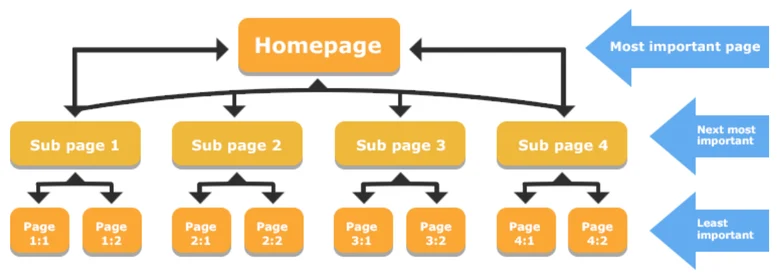
A content hub, however, is evergreen. It uses a “hub and spoke” model where a central pillar page links out to multiple related articles. This structure tells search engines that your site is a deep resource on a specific subject, rather than just a place that occasionally posts news updates. It creates a hierarchy that guides both bots and humans to the most valuable information.
Why hub-based content supports ecommerce search intent
Customers do not always start their journey by searching for a specific product. Many start with questions like “how to choose the right mountain bike” or “what is the best skincare routine for dry skin.” These users are in the discovery phase and are looking for guidance rather than a checkout button.
A content hub captures this informational intent. By providing answers, you build trust before the customer is even ready to buy. When they finally decide to purchase, your store is already the top-of-mind choice because you have already proven your value during their research phase. This reduces the friction typically found in the transition from learner to buyer.
The role of topical authority in competitive Magento niches
Google and other search engines favor websites that demonstrate expertise, authoritativeness, and trustworthiness (E-E-A-T). When you create a cluster of 10 to 15 high-quality articles about a specific niche—such as organic gardening or professional photography gear—you build “topical authority.”
This signals to crawlers that you aren’t just selling items; you are an expert in the field. This authority often helps your product pages rank higher because the overall domain strength improves. By covering a topic from every possible angle, you become the definitive source for that subject, making it harder for competitors to displace your rankings.
How content hubs support both informational and commercial pages
A content hub acts as a bridge. While the hub pages themselves are often informational, they are designed to funnel traffic toward commercial pages. This avoids the common mistake of having “dead-end” content that informs the user but provides no clear path toward making a purchase.
For instance, an article about “how to install a smart thermostat” should naturally link to the specific thermostat models you sell. This creates a seamless flow for the user and a powerful internal linking network for SEO. It transforms passive readers into active shoppers by placing the solution to their problem just one click away from the educational content.
Building an SEO-first content hub inside Magento stores
Constructing a hub requires more than just writing articles; it requires a strategic approach to architecture and user intent. You need to consider how your content will scale as your product catalog grows.
Define hub topics and search intent
The first step is identifying which topics deserve a hub. You should look at your core product categories and ask what questions customers frequently ask about them. This requires looking at data from your customer service team and search query reports.
- Identify core business topics: Look at your top-selling categories. If you sell home office furniture, a hub topic could be “The complete guide to ergonomic workspaces.” Focus on themes that have enough depth to support multiple sub-articles.
- Map search intent: Ensure you have content for “informational” intent (guides), “commercial” intent (comparisons), and “transactional” intent (product-specific details). This ensures you meet the user exactly where they are in their journey.
- Prioritize long-term value: Focus on evergreen topics that will remain relevant for years, rather than seasonal trends that lose value quickly. This maximizes the return on your content creation investment over several years.
Design the hub-and-cluster content structure
The “pillar and cluster” model is the gold standard for SEO hubs. It creates a logical map for search engine spiders to follow, ensuring every piece of content is indexed and understood in context.
- Pillar pages: These are high-level guides that cover a broad topic in depth. They should be comprehensive and act as the “home base” for a specific subject, providing a summary of all the subtopics found in the clusters.
- Cluster content: These are more specific articles that dive into subtopics. For our ergonomic workspace example, cluster articles might include “Choosing the right chair height” or “The benefits of standing desks.” Each of these should link back to the pillar.
- URL and taxonomy alignment: In Magento, you want your URLs to be clean. Use a structure like /hub/topic-name/subtopic-article. This hierarchy helps search engines understand the relationship between pages and reinforces the topical relevance of the entire folder.
Integrate the content hub into Magento architecture
Magento is a powerful platform, but it can be rigid. You must decide how the hub lives within your existing site to ensure it feels like a native part of the experience rather than a separate blog.
- Navigation: Your hub should be easy to find. Include a link in your main menu or footer. A “Resources” or “Learning Center” link in the header can significantly increase user engagement and time on site.
- Connecting to categories: On a category page for “Office Chairs,” include a sidebar link or a section at the bottom that points to your “Ergonomic Guide.” This keeps users on your site longer and provides value that purely transactional sites lack.
- Indexing and duplication: Be careful with Magento’s native functionality. Ensure your hub pages have unique meta titles and descriptions. Use canonical tags to avoid issues where the same content might appear under different URLs. To make this process easier, many merchants look at a list of Magento 2 blogs extensions to find tools that handle these SEO technicalities automatically.
Create content optimized for SEO and user experience
Content must be written for humans first, but with clear signals for AI and search crawlers. High-quality content reduces bounce rates and increases the likelihood of other sites linking back to you.
- Readability: Use short paragraphs, clear headings, and bullet points. Most users skim content before they read it, so your main points should be obvious even to someone just scrolling through the page.
- Internal links: Every cluster article should link back to the main pillar page and to relevant products. This distributes “link juice” across your site and helps search engines discover your newest product pages more quickly.
- Conversion paths: Do not be afraid to sell. If you are discussing the benefits of a specific material, provide a “Shop Now” button or a product carousel. You should also optimize product pages for SEO and UX to ensure that once a user clicks through from your content, the destination page is high-quality and ready to convert them.
Build internal linking at scale
Internal linking is the “glue” of your content hub. It tells Google which pages are the most important and how the information on your site is organized.
- Strategic linking: Link from high-authority pages to newer, lower-authority pages to help them get indexed and ranked faster. This “top-down” approach ensures your new content gains visibility almost immediately.
- Anchor text consistency: Use descriptive anchor text. Instead of “click here,” use “best ergonomic office chairs.” This helps search engines understand what the linked page is about and improves the relevance of the target page for those keywords.
- Preventing orphan pages: An orphan page is a page with no links pointing to it. Use Magento’s site map and audit tools to ensure every article in your hub is reachable through at least one internal link, preferably from a high-traffic pillar or category page.
- Rich snippets: Don’t forget technical SEO. Understanding how Magento 2 rich snippets improve click-through rates and UX can help your hub articles stand out in search results with star ratings, FAQs, or author info, making them more attractive to potential visitors.
Measure and refine content hub performance
A content hub is never truly finished. You must monitor its performance to see what is working and where your strategy needs adjustment. Regular audits are necessary to maintain the health of your hub.
- Track rankings and traffic: Use tools like Google Search Console to see which keywords are driving traffic to your hub. Look for “near-miss” keywords where you are ranking on page two and optimize that content to push it onto page one.
- Evaluate assisted conversions: Sometimes a user reads an article, leaves, and comes back later to buy. Use GA4 to track “assisted conversions” to see the true ROI of your content. This helps justify the time spent on informational guides that don’t immediately lead to a sale.
- Update and expand: Search trends change and new products are released. Update your pillar pages once or twice a year with new data, updated links, or new products to keep them fresh in the eyes of search engines.
Conclusion
Building an SEO-first content hub inside Magento stores is a long-term investment that pays off through increased organic traffic and higher brand authority. By moving beyond a simple blog and embracing a structured hub-and-cluster model, you create a powerful resource that serves both search engines and your customers. Focus on clear intent, logical internal linking, and consistent updates to ensure your Magento store remains a leader in your niche. Start small with one pillar and expand as you see your topical authority grow and your conversion rates improve over time.