
Faceted navigation, often referred to as layered navigation in the Magento ecosystem, is a cornerstone of a high-quality user experience. It allows customers to filter products by attributes like color, size, price, and brand. However, from a search engine optimization perspective, it is one of the most complex hurdles for e-commerce site owners.
In Magento, the default behavior of layered navigation often leads to significant technical SEO debt. If left unmanaged, it can dilute your site’s authority and confuse search engine crawlers. This guide explores the most critical faceted navigation SEO issues in Magento and provides actionable solutions to fix them.
Common faceted navigation SEO issues in Magento
Duplicate Content from Filter Combinations
Magento generates a unique URL for every possible filter selection and combination. While this helps users find specific products, it creates an enormous amount of identical or near-identical content.
Example of the URL structure: Consider a standard category page for shoes:
- Base category: /men/shoes.html
- Single filter applied: /men/shoes.html?color=black
- Multiple filters applied: /men/shoes.html?color=black&size=42
Why this is an issue:
When multiple filters are selected, the resulting page often displays a subset of products already found on the parent category page. Because the core content (product listings, descriptions, and metadata) remains largely the same, search engines view these as duplicate versions of the original page.
SEO impact:
- Lower ranking potential: When Google sees five versions of a “Black Shoes” page, it may not know which one to rank, leading to keyword cannibalization.
- Link equity dilution: If external sites link to different filtered versions of your page, the “link juice” is split rather than being concentrated on your primary category page.
Read more: How To Control Magento Filter Indexing Without Hurting Performance
Crawl Budget Waste in Magento Layered Navigation
Crawl budget refers to the number of pages a search engine bot will crawl on your site within a specific timeframe. Faceted navigation can create a “spider trap” that consumes this budget on low-value URLs.
Why this is an issue: A typical Magento store with 10 categories and 20 filters per category can technically generate thousands of unique URL combinations. Googlebot does not have infinite time; if it spends hours crawling every possible combination of “Price: $10-$20” and “Size: XL,” it might never reach your high-priority product pages or new blog posts.
SEO impact:
- Slower indexing: New products may take weeks to appear in search results because the crawler is stuck in the faceted navigation maze.
- Reduced site efficiency: Your most important pages (categories and products) are crawled less frequently, meaning updates to prices or stock status are reflected slower in search engine results pages.
Indexation of Low-Value Pages
Not every filtered page in Magento serves a purpose for search users. In fact, most combinations are irrelevant to search intent.
Examples of low-value pages
- Price range pages: Very few users search for “Shoes between $54 and $62.”
- Single-product result pages: Filters that result in only one or two products provide a poor landing experience.
- Rare attribute combinations: Combinations like “Yellow + Size 15 + Wool + Under $20” are too niche to target effectively.
Why this is an issue
These pages typically suffer from thin content. They lack unique descriptions and provide little value beyond a list of products that already exist elsewhere.
SEO impact
- Index bloat: Your index becomes cluttered with thousands of low-quality pages.
- Quality signals: Google evaluates the overall quality of a domain. A high ratio of thin, automated pages can drag down the perceived authority of your entire Magento store.
URL Parameter Handling Problems
Magento’s default layered navigation relies heavily on URL parameters to sort and filter data. While functional, parameters are notoriously difficult for search engines to interpret without clear instructions.
Examples of parameters
- ?price=50-100
- ?cat=12
- ?color=blue
Why this is an issue
Search engines treat URLs with different parameters as entirely separate pages. Furthermore, the order of parameters can change depending on which filter the user clicks first (e.g., ?color=blue&size=m vs ?size=m&color=blue). This creates multiple URLs for the exact same result set.
SEO impact
- Duplicate URLs: Multiple URLs pointing to the same content.
- Inconsistent indexing: Google might index the “Size” version of a page one day and the “Color” version the next, causing rankings to fluctuate.
Canonical Tag Misconfiguration in Magento
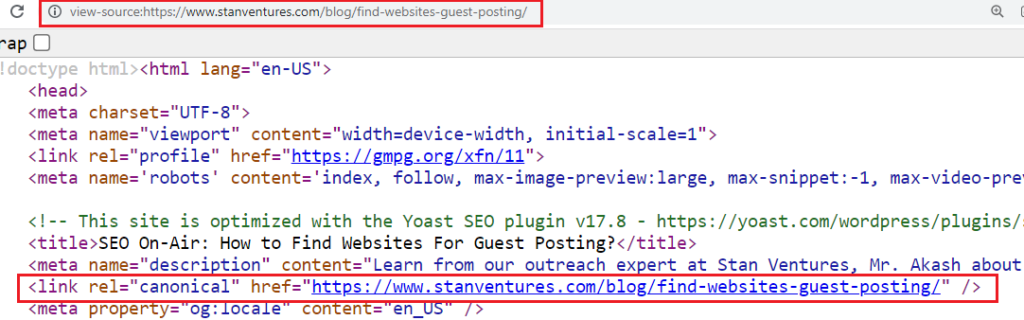
Canonical tags are the primary defense against duplicate content, telling search engines which version of a URL is the “master” copy. Unfortunately, Magento’s out-of-the-box canonical settings are often insufficient for faceted navigation.
Common problems
- Self-referencing canonicals: By default, many Magento setups allow filtered pages to point to themselves as the canonical source. This tells Google that the filtered page is a unique, primary page.
- Incorrect targets: Sometimes the canonical points to a different filtered version instead of the clean, top-level category URL.
SEO impact
- Wrong version indexed: Search engines may choose to index a filtered page over the main category page.
- Split ranking signals: Instead of all “authority” going to the main category, it is divided among various filtered URLs.
Internal Linking Dilution
Every filter link in your sidebar is an internal link. In a standard Magento sidebar, you might have 50 or more filter links on every single category page.
Why this is an issue: Internal links distribute “PageRank” or authority throughout your site. When you have an excessive number of links pointing to low-value filtered pages, you are effectively “leaking” authority away from your important pages.
SEO impact:
- Weakened key pages: Your main category pages and top-selling products receive less internal authority than they should.
- Diluted focus: Search engines may struggle to identify the most important architectural pillars of your store.
Poor Content Signals on Filtered Pages
Search engines rank pages based on relevance and content depth. Automated filtered pages in Magento rarely meet these criteria.
Most faceted pages lack:
- Unique meta titles/descriptions: They often just reuse the parent category’s metadata.
- Descriptive text: There is no H1 tag or introductory text specific to the filter selection.
- SEO optimization: They are generated by the system without human oversight.
SEO impact
- Low relevance: If a user searches for “Navy Blue Running Shoes,” a filtered page that still has the meta title “Running Shoes” will not rank well.
- Thin content classification: High numbers of pages without unique text can trigger quality algorithms like Google Panda.
How Magento Stores Usually Fix These Issues
Fixing faceted navigation requires a balance between SEO control and user experience. To streamline this process and ensure your technical settings are perfect, many merchants utilize a specialized tool to automate canonicals and meta tags: https://bsscommerce.com/magento-2-seo-extension.html
Use noindex, follow for non-valuable filter pages
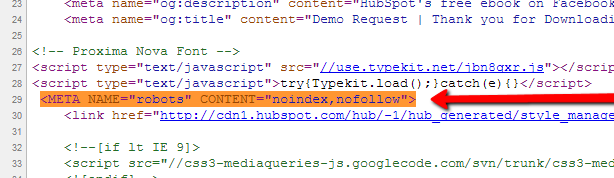
For filters that have no search volume (like price or size), the best practice is to add a noindex, follow meta tag. This allows search engines to discover the products on those pages but prevents the filtered URLs from appearing in search results.
Allow indexation only for high-intent filters
Some filters should be indexed. For example, if people search for “Nike Shoes,” then the “Brand: Nike” filter on your shoes category is valuable. In these cases, you should allow indexation and optimize the metadata for that specific filter.
Configure canonical URLs to point to the main category
By default, ensure that all filtered pages (except for those you specifically want to index) have a canonical tag pointing back to the base category URL.
Limit crawlable parameters using robots.txt
You can prevent bots from even looking at certain filters by adding “Disallow” rules in your robots.txt file.
Plaintext
Disallow: /*?*price=
Disallow: /*?*dir=
Disallow: /*?*mode=
Create SEO-friendly URLs for selected filters
Instead of ?color=blue, you can configure your store to generate URLs like /shoes/blue.html. This should only be done for high-value attributes that you intend to rank for.
Read more: Magento Category Architecture Affects Product Discovery
Add unique content for strategic filter landing pages
For the filter pages you choose to index, treat them like actual category pages. Add unique H1 tags, custom meta descriptions, and a few sentences of descriptive text at the top of the page.
Conclusion
Faceted navigation is a powerful tool for user experience, but it is a significant risk for SEO in Magento if not properly managed. Without strict control, it leads to duplicate content, crawl budget waste, and index bloat.
The goal is not to remove faceted navigation, but to decide which filter pages deserve to be indexed and which should stay invisible to search engines. By implementing proper canonical tags, managing your robots.txt, and using specialized SEO extensions, you can ensure your Magento store remains lean, authoritative, and easy for search engines to crawl.