

The holiday season represents the most significant revenue opportunity for e-commerce businesses. For merchants using Magento (Adobe Commerce), the platform provides a robust suite of native tools designed to handle high traffic and complex promotional logic. Success during these peak periods requires a blend of psychological triggers—like urgency and social proof—and technical precision within the Magento backend.
This guide explores nine actionable holiday marketing ideas for Magento, providing technical implementation steps and strategic insights to help you convert seasonal browsers into loyal customers.
Create holiday-specific promotions to drive conversion
Holidays are notoriously price-sensitive periods. Shoppers are actively looking for the best value, and clear, rule-based promotions are the most effective way to drive immediate conversions. Magento offers two primary ways to handle this: Cart Price Rules and Catalog Price Rules.
Use cart price rules for flexible incentives
Cart Price Rules apply discounts in the shopping cart, often triggered by a coupon code or specific conditions.
- Percentage discounts: Implement “15% off sitewide” or “30% off your entire order” to appeal to broad audiences.
- Tiered incentives: Encourage higher spending by setting rules like “Spend $150, get $20 off” or “Spend $250, get $50 off.” This directly impacts your Average Order Value (AOV).
- Buy X get Y deals: Use the “Buy 3, get the 4th free” logic to move inventory quickly during peak windows like Black Friday.
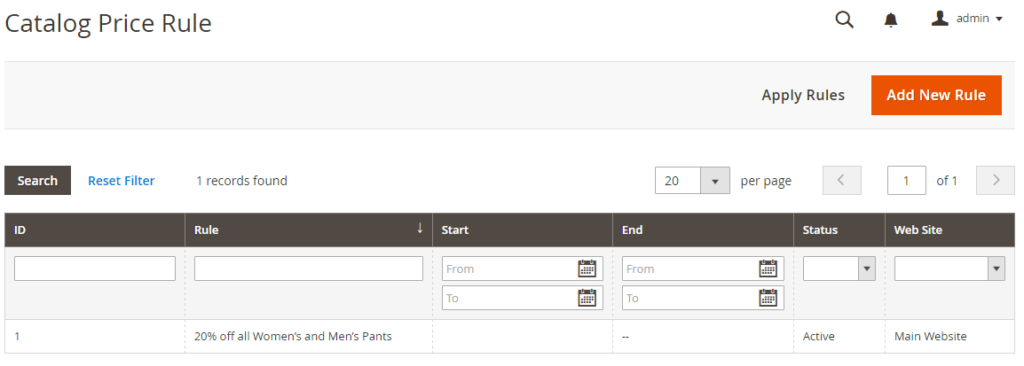
How to configure Catalog Price Rules (Sitewide sales)
- Navigate to Marketing > Promotions > Catalog Price Rule.
- Click Add New Rule.
- Rule Information: Set a name (e.g., “Christmas 20% Off”) and assign it to your Websites and Customer Groups.
- Conditions: Click the “plus” icon to select attributes. Example: Category is 12 (where 12 is your holiday category ID).
- Actions: Set Apply to “Apply as percentage of original” and Discount Amount to 20.
- Schedule: Use the calendar icons to set the exact start and end times.
- Crucial Step: Click Save and Apply; Catalog rules do not take effect until they are “Applied” to the database.
Use catalog price rules for automated sales
Unlike cart rules, Catalog Price Rules are applied to products before they are added to the cart. This allows customers to see the discounted price while browsing the category pages.
- Holiday collection discounts: Apply a flat discount to specific categories, such as “Christmas Decor” or “Winter Apparel.”
- Scheduled sales: One of Magento’s strongest features is the ability to schedule these rules. You can set the start and end dates weeks in advance, ensuring your sale goes live at midnight without manual intervention.
How to configure Cart Price Rules (Coupon codes & tiered spending)
- Navigate to Marketing > Promotions > Cart Price Rules.
- Rule Information: Set Coupon to “Specific Coupon” and enter a code like GIFT2025.
- Conditions: To create tiered spending, set: Subtotal equals or greater than 100.
- Actions: Under Apply, choose “Fixed amount discount for whole cart” and set the value.
Extra tip for margin protection:
When running multiple promotions, stack rules carefully. Use the Priority setting to determine which rule applies first and enable Discard Subsequent Rules to prevent “margin leakage,” where a customer accidentally applies multiple deep discounts to a single item.
Build holiday landing pages with CMS and widgets
A generic category page rarely provides the festive atmosphere or the focused “buy now” environment needed for a holiday sale. Dedicated landing pages allow you to curate products and control the narrative.
Magento features to use
- CMS pages: Create high-converting pages for specific events like Black Friday, Cyber Monday, or the Lunar New Year. Use Magento’s Page Builder (available in newer versions) to drag and drop elements like banners, countdown timers, and promotional text.
- Widgets: Use widgets to dynamically insert product blocks into your CMS pages. You can display “Best Sellers,” “New Arrivals,” or “Top Rated Gifts” without needing to manually update the list as inventory changes.
The SEO angle: Do not wait until December to launch your holiday pages. Optimize your URLs (e.g., /black-friday-deals) and meta titles early. By publishing these pages a month or two in advance—even with “Coming Soon” placeholders—you allow Google to index the URL, ensuring you rank higher when search volume peaks.
Step-by-step landing page setup
- Create the Page: Go to Content > Elements > Pages > Add New Page.
- URL Key: Set this to something SEO-friendly like black-friday-deals.
- Using Page Builder: Drag a Banner element to the top for your hero image.
- Adding Products via Widgets: * In the Page Builder, drag a HTML Code or Text block.
- Click Insert Widget.
- Select Catalog Products List.
- Set Conditions to “Category is [Your Holiday Category]” to automatically pull in seasonal items.
- Design: Under the Design tab, you can change the layout to “1 column” to give the page a clean, focused look.
Read more: Magento BFCM marketing ideas
Leverage free shipping thresholds to increase order value
In the world of e-commerce, free shipping is often more persuasive than a percentage discount. High shipping costs are the leading cause of cart abandonment, especially during the holidays when shoppers are placing multiple orders across different sites.
Magento setup
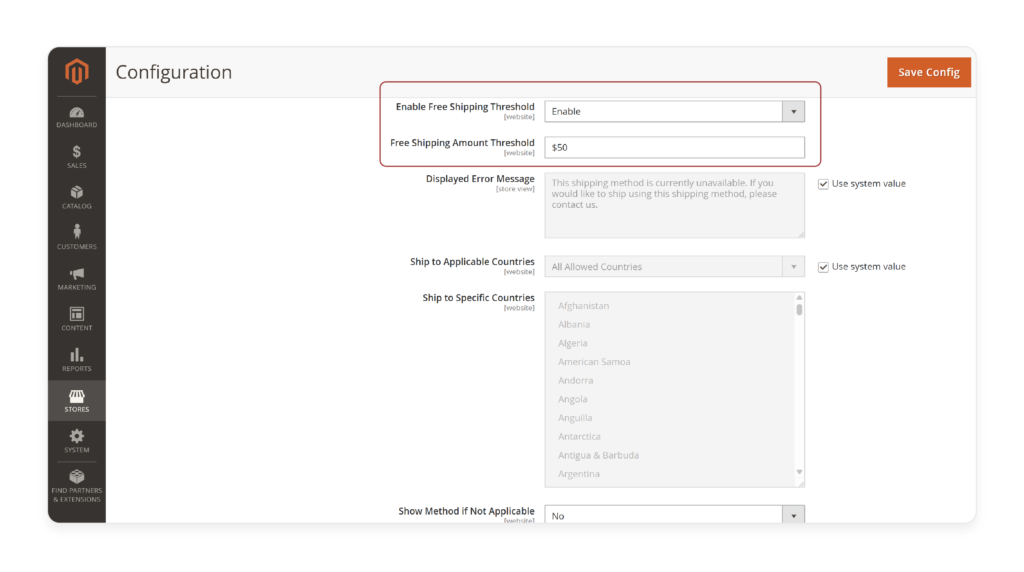
- Configure free shipping method: Go to Stores > Configuration > Sales > Shipping Methods to enable the native Free Shipping option.
- Combine with cart price rules: Instead of making it sitewide, set a minimum threshold. Create a rule that grants free shipping only for orders over $99. This creates a psychological “bridge” where customers add one more small item to their cart just to avoid the shipping fee.
- Targeted shipping: You can also restrict free shipping to specific Customer Groups, such as your logged-in loyalty members, as a reward for their patronage.
Advanced urgency idea
Consider offering “Holiday-only free shipping” for a limited 48-hour window. This creates a sense of urgency that forces a decision, helping you capture early-bird shoppers before your competitors do.
Use customer segmentation for targeted holiday offers
One-size-fits-all marketing is rarely efficient. A returning VIP customer should not receive the same offer as a first-time visitor who has never interacted with your brand. Magento’s built-in customer segmentation (available in Adobe Commerce) or Customer Groups (available in Open Source) allow for precise targeting.
Magento built-in options
By categorizing your database into VIP, wholesale, and returning customers, you can assign different perks:
- Exclusive discounts: Give your VIPs a higher percentage off as a thank-you for their loyalty.
- Free gifts: Automatically add a small holiday-themed gift to the carts of customers in the “High-Spender” segment.
- Early access: This is a powerful strategy for Black Friday. Allow your VIP segment to access the holiday landing page 24 hours before the general public. This ensures your best customers get first pick of limited inventory.
Read more: Best Practices for Magento 2 landing pages during peak seasons
Highlight gift-ready features for seasonal shoppers
Holiday shoppers are often buying for others, which changes their requirements. They care less about personal fit and more about presentation, ease of return, and delivery guarantees.
Magento tactics
- Enable gift messages: Magento has a native feature to allow gift messages at both the order level and the item level. Enable this in Stores > Configuration > Sales > Gift Options.
- Curated gift categories: Create “Gifts under $50” or “Gifts for Him/Her” categories. This simplifies the decision-making process for overwhelmed shoppers.
- Promote digital products: For last-minute shoppers, highlight Magento’s Virtual or Downloadable products. Digital gift cards are the ultimate safety net for customers who missed the shipping deadline.
If your budget allows, consider a gift-related extension that adds functionality for premium gift wrapping or allows the customer to schedule the exact date a digital gift card is emailed to the recipient.
Optimize checkout for holiday traffic spikes
The checkout is the most critical part of the funnel. During the holidays, any friction—a slow-loading page, a forced account creation, or a missing payment method—will lead to a lost sale.
What to focus on
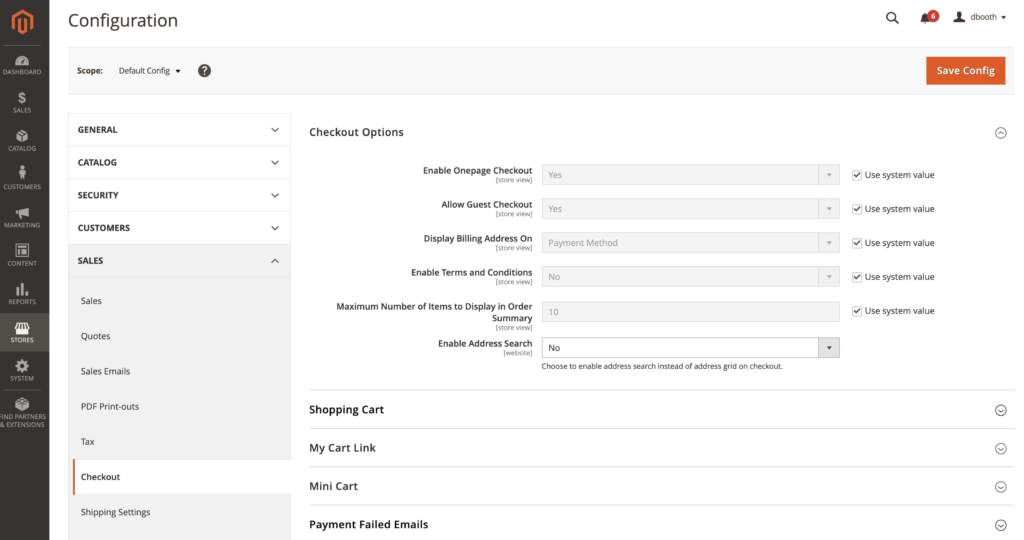
- Enable guest checkout: Do not force users to register during a holiday rush. Let them buy quickly and offer the option to create an account after the purchase is complete.
- Popular payment methods: Ensure you support mobile-friendly wallets like Apple Pay and Google Pay. Additionally, Buy Now Pay Later (BNPL) options like Affirm or Klarna are highly effective during the holidays, as they allow shoppers to manage their seasonal budget.
- Performance testing: Holiday traffic can be 5x to 10x higher than normal. Use a tool like JMeter or a professional load-testing service to ensure your Magento server and checkout flow won’t crash under the weight of thousands of concurrent users.
Run urgency-driven campaigns to trigger action
Scarcity and urgency are fundamental drivers of human behavior. During a short holiday sale window, shoppers need a reason to buy now rather than waiting until tomorrow.
Magento execution
- Countdown timers: While not native to the base code, timers can easily be added to your homepage banners via Page Builder or simple blocks.
- Low-stock notices: Enable “Only X left in stock” messages on product pages. In Magento, you can configure this in the Inventory settings to appear when stock hits a certain threshold.
- Auto-expiring rules: Ensure your Cart Price Rules have a hard “To Date.” When the clock strikes midnight, the discount disappears, maintaining the integrity of your promotion.
Best practice note: Avoid “dark patterns” like fake countdown timers or fabricated stock levels. Modern consumers are savvy; use real deadlines and real stock data to build long-term trust.
Re-engage holiday visitors after the sale ends
The cost of acquiring a customer during the holidays is high due to increased ad spend. To maximize your Return on Investment (ROI), you must turn these one-time holiday shoppers into repeat buyers.
Post-holiday ideas include:
- Abandoned cart recovery: Use Magento’s reach-out capabilities or an integrated email service provider (like Klaviyo or Dotdigital) to send a reminder to shoppers who left items behind.
- The “Thank You” offer: Send a follow-up email to first-time holiday buyers in January with a “New Year, New Gear” discount.
- Clearance campaigns: Use the period immediately after Christmas to clear out seasonal inventory using a dedicated “Post-Holiday Clearance” category.
By moving these customers into a specific Customer Group based on their holiday purchase, you can continue to target them with relevant content throughout the following year.
Holiday campaigns are just one part of the puzzle. To build consistent growth beyond seasonal spikes, explore 20 practical Magento sales tips you can apply year-round to improve conversion rates, increase average order value, and retain more customers.
Prepare reporting for holiday performance analysis
The most valuable asset you gain from the holiday season—besides revenue—is data. What you measure this year will determine the strategy for next year.
Track these metrics in Magento
- Revenue per promotion rule: Which coupon code performed best? Did “15% off” generate more total profit than “Free Shipping”?
- Conversion rate per landing page: Did your “Black Friday” page convert better than your standard category pages?
- Average Order Value (AOV): Compare your holiday AOV to your yearly average. If it’s lower, you may need better “upsell” and “cross-sell” configurations in the future.
If the native Magento reports are not granular enough for your needs, you can export your order data to a CSV for analysis in Excel or use Business Intelligence (BI) tools to visualize the trends in real-time.
Conclusion
Maximizing the holiday season on Magento requires a proactive approach that touches every part of the store, from the initial landing page to the final checkout confirmation. By leveraging Catalog and Cart Price Rules for strategic discounting, optimizing for mobile-first checkout, and using customer segmentation for personalized experiences, you can create a high-performance environment that scales with your traffic.
Success isn’t just about the sale today; it’s about using the platform’s robust features to provide a seamless experience that brings customers back in the new year.