

Magento (Adobe Commerce) is widely regarded as one of the most powerful e-commerce platforms available. However, its complexity means that out-of-the-box settings are rarely enough to dominate search engine results pages (SERPs). Magento SEO marketing focuses on leveraging the platform’s robust technical architecture, flexible content management, and vast extension ecosystem to grow organic traffic and long-term revenue.
This guide provides a comprehensive roadmap for store owners and marketing teams to master Magento SEO, from technical foundations to advanced content strategies.
Technical SEO Foundation in Magento
Technical SEO is the bedrock of any Magento site. Because Magento generates a vast number of URLs through its catalog system, ensuring search engines can crawl and index your site efficiently is paramount.

Search Engine Optimization Settings
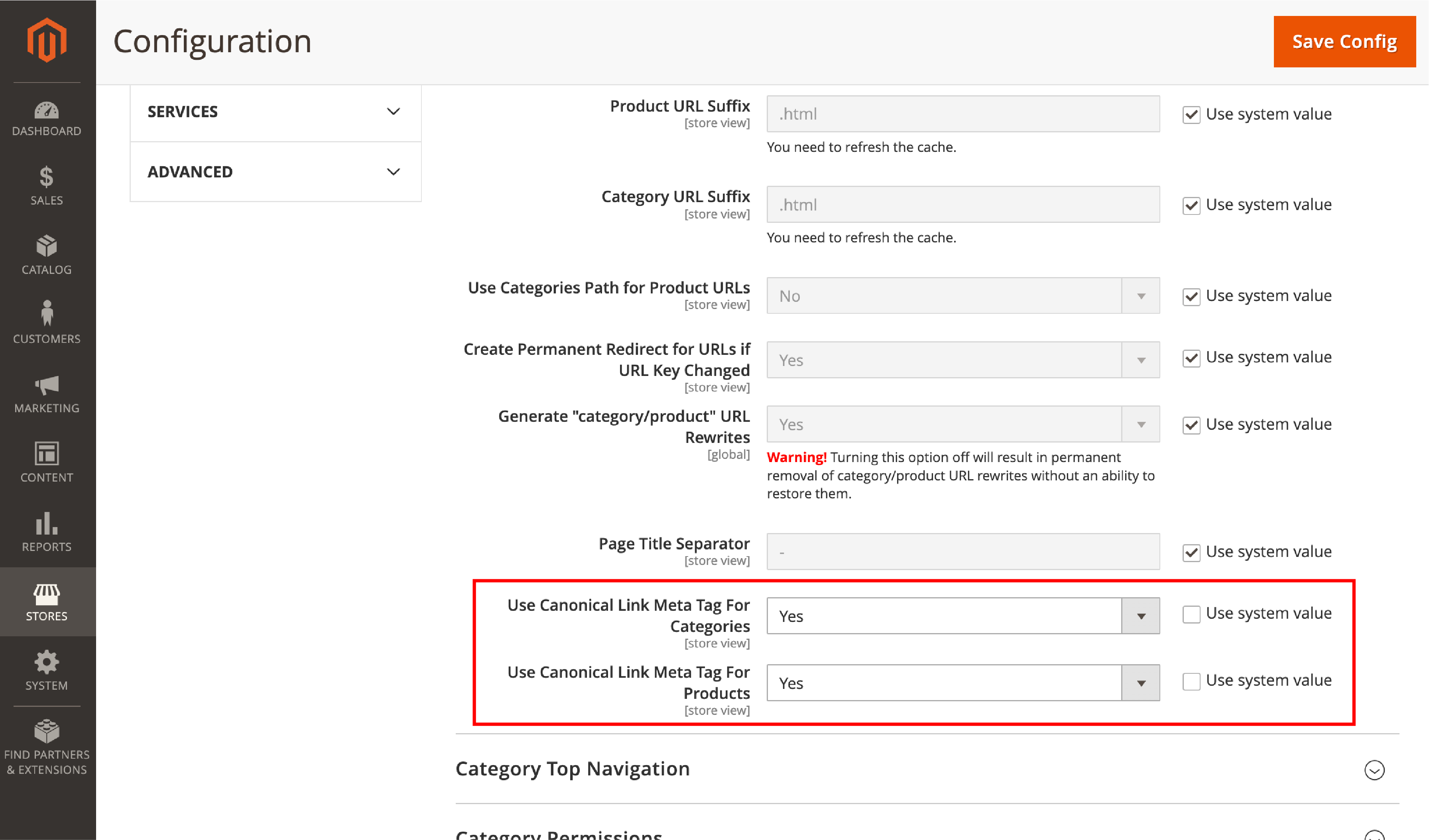
Navigate to Stores > Configuration > Catalog > Catalog > Search Engine Optimization.
- Product URL Suffix: Set this to blank (remove .html). Modern SEO prefers clean URLs like domain.com/product-name.
- Category URL Suffix: Set to blank for the same reason.
- Use Categories Path for Product URLs: Set to No. This prevents duplicate content where the same product is accessible at domain.com/category/product and domain.com/other-category/product. It forces a flat structure: domain.com/product-name.
- Create Permanent Redirect for URLs if URL Key Changed: Always set to Yes. This automatically creates a 301 redirect if you rename a product, preserving link equity.
URL Structure and Canonical Tags
Magento allows for clean, descriptive URLs. By default, you can remove the “.html” suffix and category paths from product URLs to keep them concise.
- Canonical Tags: Magento has built-in support for canonical tags. This is vital for preventing duplicate content issues caused by products appearing in multiple categories or sorted via parameters.
- Use Canonical Link Meta Tag For Categories: Set to Yes.
- Use Canonical Link Meta Tag For Products: Set to Yes.
- Meta Robots: You can define instructions (INDEX, FOLLOW or NOINDEX, NOFOLLOW) at the global, category, or product level to control how Google interacts with specific pages.
XML Sitemaps and Robots.txt
You don’t need external tools to manage your crawl instructions.
- XML Sitemap: Magento can automatically generate and update your sitemap. You can set the frequency of updates and priority for different page types (e.g., categories vs. products).
- Go to Stores > Configuration > Catalog > XML Sitemap.
- Categories/Products/CMS Pages Options: Set the frequency to Daily and priority to 0.5 or 1.0 for your most important pages.
- Generation Settings: Enable Scheduled Generation. This ensures that as you add new products, they are automatically added to the sitemap without manual intervention.
- Sitemap File Limits: Ensure the max number of URLs per file is 50,000 (per Google’s limit).
- Robots.txt: Managed directly from the Admin Panel, this file tells bots which parts of your server to avoid, saving your “crawl budget” for high-value pages.
Schema, Hreflang, and Redirects
- Schema Markup: Modern Magento versions support basic Schema.org integration, allowing search engines to understand your data better.
- Hreflang: For international stores, Magento’s store view architecture makes implementing hreflang tags straightforward, ensuring the right language version appears in the right region.
- URL Rewrites: The built-in URL Rewrite tool is essential for managing 301 redirects during site migrations or when deleting old products.

Performance Optimization
Site speed is a direct ranking factor. Magento is resource-intensive, so performance optimization is a marketing necessity:
- Full Page Cache (FPC) & Varnish: These are non-negotiable for fast server response times.
- Content Delivery Network (CDN): Offload static assets (images, CSS, JS) to a CDN to reduce latency for global users.
- Image Optimization: Use WebP formats and lazy loading to ensure high-resolution product photos don’t tank your PageSpeed scores.
- Images and Videos: Always fill in the Alt Text for every image. Search engines use this to “see” your products.
- Related Products, Up-sells, and Cross-sells: Use these sections to build internal links. A “Related Product” link is a signal to Google that two pages are topically relevant to each other.
On-Page SEO for Magento Stores
While technical SEO gets you invited to the party, on-page SEO is what makes you the guest of honor. Magento offers deep control over how individual pages are presented to search engines.
Metadata Management
Every Product, Category, and CMS page in Magento includes fields for Meta Titles and Meta Descriptions.
- Title Tags: Keep these under 60 characters and lead with your primary keyword.
- Meta Descriptions: While not a direct ranking factor, these act as “ad copy” in the SERPs to improve Click-Through Rate (CTR).
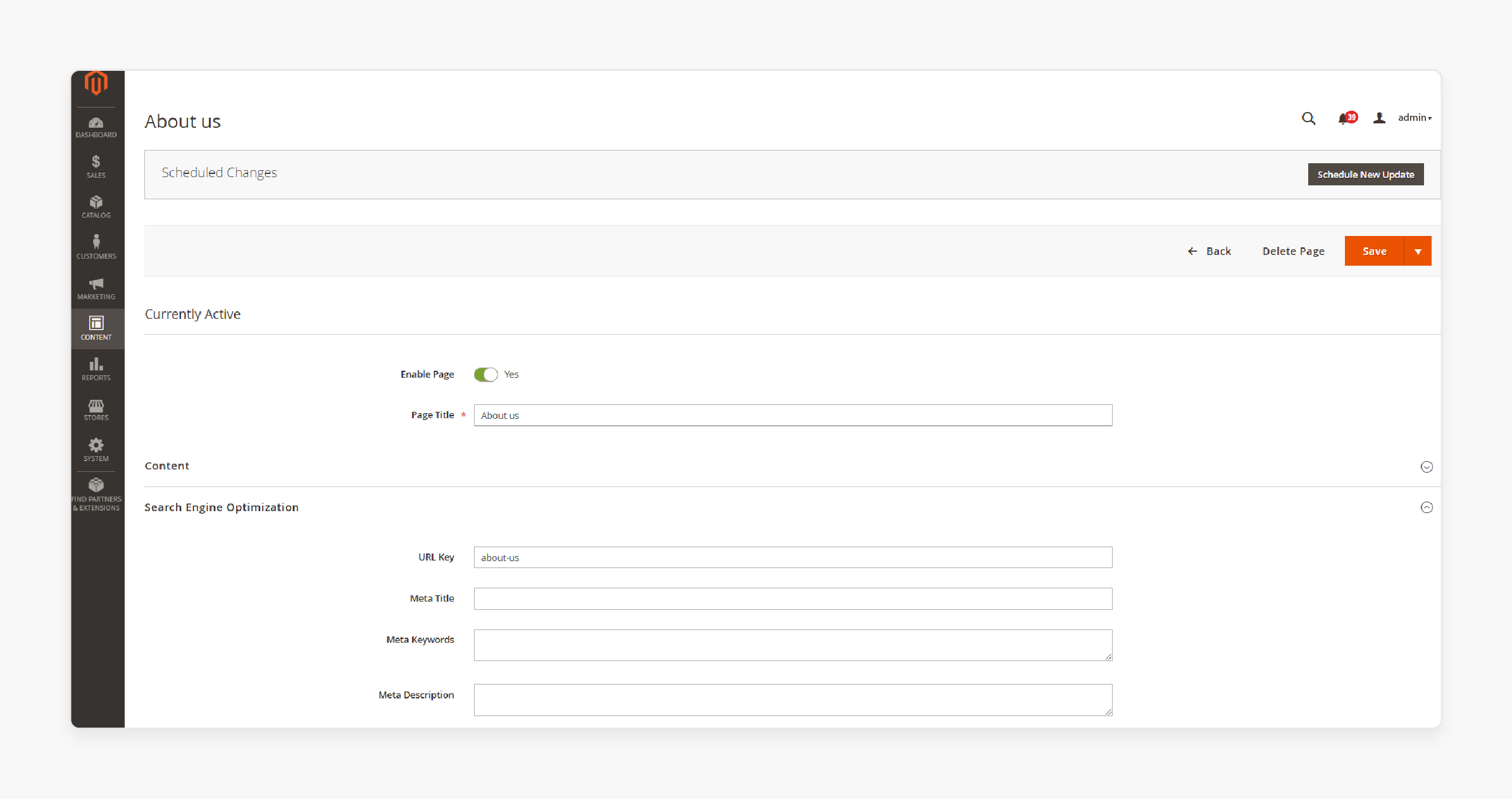
Note for category pages content: In Magento SEO marketing, Category Pages are your “Money Pages.” While product pages are specific, category pages target broader, high-volume keywords (e.g., “Men’s Leather Boots”).
- Category Descriptions: Don’t just list products. Add unique, keyword-rich content at the top or bottom of the category page to provide context to search engines.
- H1 Tags: Ensure the category name is wrapped in an H1 tag and accurately reflects the search intent.
Handling Layered Navigation
Layered navigation (filters) is great for UX but a nightmare for SEO if mismanaged. Filters like “Price,” “Color,” or “Size” can create thousands of duplicate URLs.
- The Fix: Use “noindex” tags on filter-generated URLs or utilize an SEO extension that uses AJAX for filtering to prevent bots from crawling unnecessary permutations.
Internal Linking Strategies
Internal links distribute “link equity” (ranking power) across your site.
- Related Products: Use Magento’s built-in “Related Products,” “Up-sells,” and “Cross-sells” to create a web of internal links.
- CMS Blocks: Insert links to top-performing categories within your homepage or blog posts to boost their authority.
Content Marketing on Magento
A common mistake in Magento SEO is focusing solely on product data. To compete with giants like Amazon, you must provide informational value that spans the entire customer journey.
Developing a Blog Strategy
Magento does not have a native blog. However, using a blog extension allows you to target “top-of-funnel” keywords.
- Informational Keywords: Write “How-to” guides, “Best of” lists, and “Buying Guides.” For example, if you sell espresso machines, a blog post on “How to Dial in Your Espresso Grind” captures users before they are ready to buy.
- Content Hubs and Topical Authority: Build “Hub Pages” around your core categories. If you sell outdoor gear, create a comprehensive “Camping Guide” CMS page that links out to sub-categories like Tents, Sleeping Bags, and Cooking Gear. This signals to Google that you are an authority in the “Camping” niche.
- Semantic Keywords and Topical Coverage: Don’t just repeat one keyword. Use Latent Semantic Indexing (LSI) keywords—terms related to your main topic. If your main keyword is “Organic Skincare,” include micro-topics like “paraben-free,” “cruelty-free,” and “natural ingredients” to satisfy Google’s desire for comprehensive content.
Configuration guide
- CMS Pages for Landing Pages
- Go to Content > Elements > Pages.
- Hierarchy: Use CMS pages to create “Buying Guides.” For example, a page titled “Choosing the Right Mountain Bike” can link to your “Mountain Bike” category.
- SEO Tab: Just like products, CMS pages require unique Meta Titles and Descriptions.
- Page Layout: Use the “1 Column” layout for blog-style content to improve readability and reduce CLS (Cumulative Layout Shift).
- Static Blocks for Internal Linking
- Go to Content > Elements > Blocks.
- Use blocks to insert “SEO Text” into footers or sidebars across specific categories.
- Benefit: If you want to link your top 5 best-selling products from every page in a category, a Static Block allows you to update those links in one place rather than editing every product page.
Conversion-Focused SEO (SEO + UX)
Traffic is a vanity metric; revenue is a sanity metric. Magento SEO marketing must align search visibility with User Experience (UX).
Optimizing Product Pages for Intent
A product page should answer every question a buyer might have.
- Unique Descriptions: Never use the manufacturer’s boilerplate text. It’s likely duplicated on hundreds of other sites.
- Customer Reviews: User-generated content provides a constant stream of fresh, unique text for search engines to index.

Core Web Vitals (CWV)
Google’s Core Web Vitals measure the “health” of your user experience:
- LCP (Largest Contentful Paint): How fast the main content loads.
- CLS (Cumulative Layout Shift): Ensuring elements don’t jump around as the page loads.
- INP (Interaction to Next Paint): How responsive the page is to user clicks. Magento stores often struggle with these due to heavy JavaScript. Optimizing your theme’s code is essential for both SEO and keeping users on the site.
Rich Snippets and CTR
By implementing structured data (JSON-LD), you can display “Rich Snippets” in search results.
- Price and Availability: Show users the price before they even click.
- Star Ratings: Visual social proof that significantly increases CTR.
- Stock Status: “In Stock” tags encourage clicks from ready-to-buy shoppers.
Extensions and Advanced SEO Marketing
While Magento is powerful, extensions allow you to scale your efforts and automate repetitive tasks.
Essential SEO Extensions
The Magento marketplace offers “All-in-One” SEO suites (from providers like Amasty, Mageworx, or Mirasvit) that offer:
- Metadata Templates: Automatically generate meta titles and descriptions for thousands of products using variables (e.g., [Product Name] – [Color] – Buy Online).
- Advanced Redirect Managers: Automatically catch 404 errors and suggest redirects.
- Automated Cross-linking: Automatically link specific keywords in your descriptions to chosen category pages. For advanced automation across marketing channels, including email and promotions, see our Magento Marketing Automation guide.
Analytics and Revenue Tracking
You cannot manage what you do not measure.
- Google Analytics 4 (GA4) Integration: Ensure your Magento store is correctly passing E-commerce events (view_item, add_to_cart, purchase) to GA4.
- Keyword-to-Revenue Performance: Use tools like Google Search Console alongside your sales data to identify which keywords actually drive sales, not just clicks.
Full-Funnel Integration
SEO doesn’t exist in a vacuum.
- Email Marketing: Use SEO-driven blog content in your newsletters to drive repeat traffic.
- Social Media: Share your CMS landing pages and blog posts to generate social signals.
- PPC: Use insights from your high-converting SEO keywords to inform your Google Ads strategy, and vice versa. Learn more about balancing organic and paid strategies in Magento in our Magento SEO vs PPC guide.
Conclusion
Magento SEO marketing is a marathon, not a sprint. By focusing on a rock-solid technical foundation, optimizing your category and product pages, and committing to a content strategy that builds authority, you can transform your Magento store into a high-ranking, high-converting asset.
The key is consistency. Regularly audit your site for technical errors, keep an eye on your Core Web Vitals, and never stop adding value for your customers.