

In the competitive world of e-commerce, the difference between a bounce and a conversion often comes down to user experience (UX). Magento 2 is a powerhouse platform, but its “out-of-the-box” functionality sometimes lacks the finesse required to meet modern consumer expectations.
To bridge this gap, store owners rely on extensions to streamline the customer journey. This guide explores the essential Magento 2 extensions designed to enhance every touchpoint—from the moment a user searches for a product to the final click of the “Place Order” button.
Enhancing navigation and discovery
Navigation is the roadmap of your online store. If customers cannot find what they are looking for within seconds, they will leave. Improving discovery involves optimizing how users search and how they filter through large catalogs.
Smart search and autocomplete
Standard search functions often frustrate users by requiring exact keyword matches. Smart search extensions utilize Elasticsearch or OpenSearch to provide a more intuitive experience.
- Autocomplete suggestions as users type: As soon as a user enters two or three characters, the extension displays a dropdown of predicted products, categories, and even blog posts.
- Search by SKU and attributes: Power users or B2B buyers often search by specific part numbers. Smart search ensures these queries return accurate results.
- Synonyms and typo-tolerance: If a user types “sneeker” instead of “sneaker,” a smart extension recognizes the intent and shows the correct results anyway.
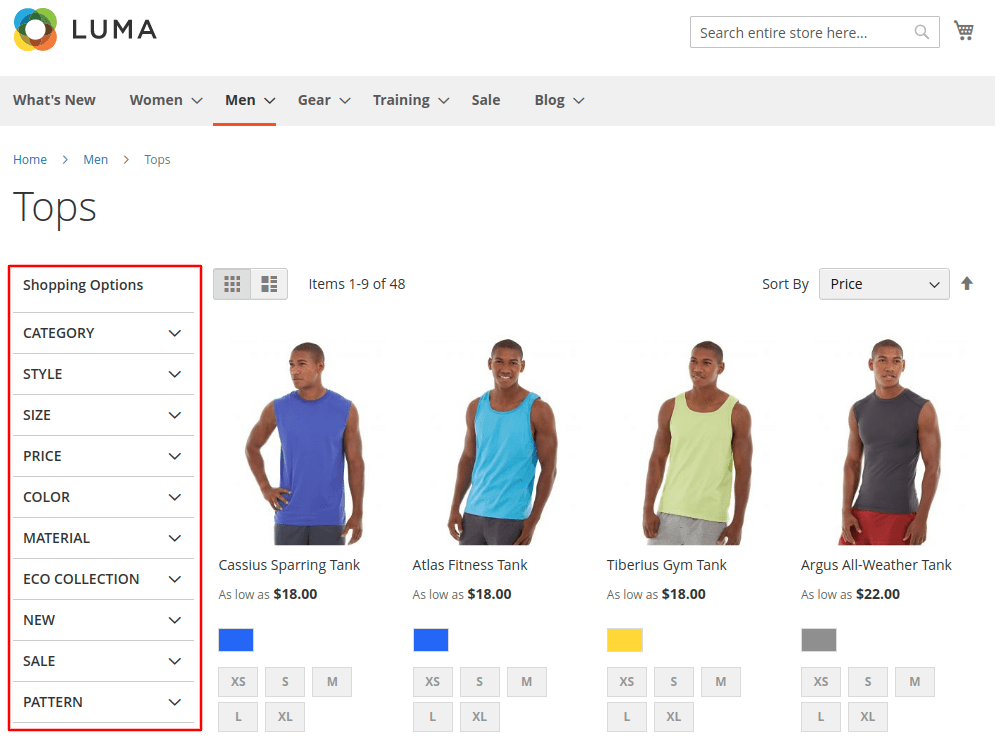
Layered navigation and filters
For stores with hundreds or thousands of SKUs, standard Magento filtering can be slow and clunky. Advanced layered navigation extensions are essential for keeping the browsing experience fluid.
- Ajax filters: This is the gold standard for UX. It allows the product grid to update instantly when a filter is selected without reloading the entire page.
- Multi-select filters: Users should be able to select “Blue,” “Large,” and “Under $50” simultaneously to narrow down their choices efficiently.
- Visual attributes: Instead of text links, you can use color swatches, brand logos, or price sliders to make the filtering process more visual and engaging.
Advanced layered navigation improves product discovery, but it can create serious SEO issues at scale. Multiple filter combinations often generate thousands of parameter-based URLs, leading to duplicate content and wasted crawl budget. Learn more about optimizing Magento UX and SEO here.
A Magento 2 SEO extension helps you control filter URLs, set canonical tags, manage index/noindex rules, and optimize category metadata—so you keep fast, flexible filtering without hurting search visibility.
Mega menu
A cluttered header menu is a major UX pitfall. Mega menus allow you to organize complex hierarchies into a clean, digestible format.
- Horizontal and vertical layouts: Depending on your store’s design, you can use wide horizontal menus or “fly-out” vertical menus.
- Multi-column organization: Group sub-categories logically into columns so users can scan the entire department at a glance.
- Rich media support: Modern mega menus allow you to embed images, promotional banners, and even “featured product” blocks directly within the navigation.
Product page enhancers for higher conversion
Once a user lands on a product page, your goal is to provide enough information and confidence to trigger an “Add to Cart” action.
Enhanced product images and zoom
Since online shoppers cannot touch the products, visual fidelity is everything. Basic Magento image viewers often feel dated.
- Lens zoom and full-screen gallery: High-resolution zoom allows customers to inspect textures, stitching, or technical details.
- Mobile-optimized swiping: On mobile devices, the gallery should support natural touch gestures like swiping and “pinch-to-zoom.”
- Thumbnail carousel: Organize additional views (back, side, lifestyle) in an easy-to-navigate carousel that doesn’t clutter the page.
Frequently bought together and cross-sell blocks
Increasing the Average Order Value (AOV) is a key business goal that also benefits the user by suggesting relevant items they might have forgotten.
- AI or rule-based recommendations: These extensions analyze historical data to suggest items that are frequently purchased in tandem (e.g., suggesting batteries with a toy).
- Bundle deals: Allow users to add the main product and its recommended accessories to the cart with a single click, often with a small “bundle discount” incentive.

Customer reviews and ratings
Social proof is a psychological necessity in e-commerce. It builds trust and provides unbiased information that a brand’s marketing copy cannot.
- Star rating display: Visible ratings on both category and product pages help users gauge quality quickly.
- Detailed review forms: Modern extensions allow users to upload their own photos of the product and filter reviews by “verified buyer” status.
- Rich snippets: These extensions format your reviews so that Google can display star ratings directly in the search engine results pages (SERPs), increasing your click-through rate.
Optimizing Magento cart and UX in checkout page
The checkout process is the most volatile stage of the funnel. Even the smallest amount of friction here can lead to cart abandonment.
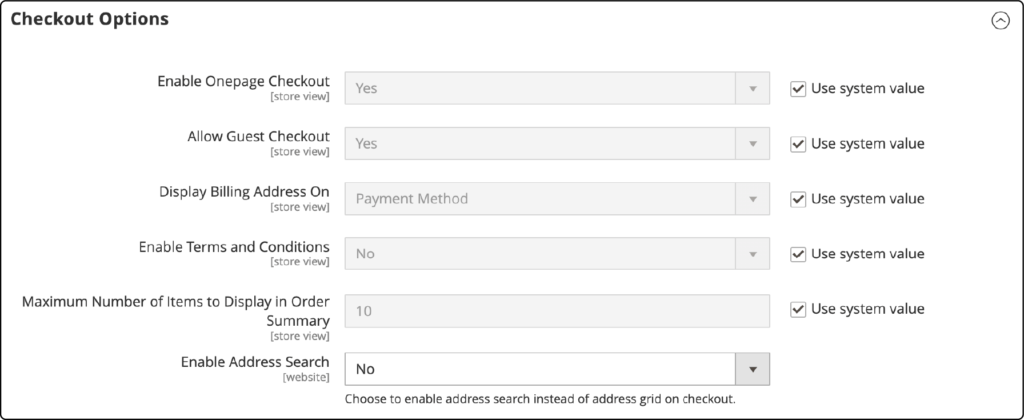
One-step checkout
The default Magento 2 checkout is a multi-step process that can feel tedious. One-step checkout extensions consolidate all necessary fields—shipping, billing, and payment—onto a single page.
- Reduced fields: By hiding unnecessary fields or combining “First Name” and “Last Name,” you reduce the cognitive load on the customer.
- Address autocomplete: Integrating Google Places API allows users to start typing their address and select the correct one from a list, eliminating manual entry errors.
- Guest checkout support: Forcing account creation is a leading cause of abandonment. One-step checkouts prioritize guest flows to keep the process fast.
Sticky cart and Ajax add to cart
Navigating back and forth between the cart and product pages creates unnecessary friction.
- Ajax add to cart: When a user clicks “Add to Cart,” a confirmation pop-up or a sliding mini-cart appears without refreshing the page. This allows the user to continue shopping immediately.
- Sticky cart: As the user scrolls down a long product description, a small “Buy” bar remains at the top or bottom of the screen so they don’t have to scroll back up to make a purchase.
Delivery date and time picker
For many shoppers, knowing when they will receive their item is just as important as the price.
- Calendar selector: Allow users to pick a specific delivery day that suits their schedule, which is particularly vital for gifts or perishable goods.
- Cut-off time rules: The extension can dynamically tell users, “Order within the next 2 hours for delivery tomorrow.”
- Blackout dates: Easily manage holidays or weekends when your warehouse or shipping carriers are not operating.
Improving account management and personalization
The user experience shouldn’t end at the “Thank You” page. Building long-term loyalty requires a personalized post-purchase environment.
Customer account enhancements
The default “My Account” area in Magento is often utilitarian and boring. Enhancing this space makes it easier for customers to manage their relationship with your brand.
- Order history filters: Allow customers to quickly find previous orders to re-order items or track shipments.
- Advanced dashboard: A centralized hub where users can see their loyalty points, recent reviews, and personalized “Wishlist” items.
- Social login: Reduce login friction by allowing users to sign in via Google, Facebook, or Apple.
Personalized recommendations
Personalization makes a store feel curated for the individual. By using behavioral data, you can surface products that align with a user’s specific interests.
- “Recommended for you” blocks: These appear on the homepage or account dashboard based on the user’s past browsing and purchase history.
- Cart behavior signals: If a user abandons a specific category of items, personalized extensions can send a targeted “We thought you’d like these” email or show a custom banner upon their return.
Maximizing performance and mobile UX
A beautiful store is useless if it takes ten seconds to load. Performance is a core pillar of UX, especially for the growing segment of mobile shoppers. Explore our guide on Magento mobile-first design here to ensure your store performs seamlessly on every device.
Image optimization
High-quality images are heavy. Without optimization, they will cripple your site speed and hurt your SEO rankings.
- WebP support: This modern image format provides superior compression compared to JPEG or PNG, significantly reducing file sizes without losing visual quality.
- Lazy loading: This technique ensures that images only load when they are about to enter the user’s viewport, saving bandwidth and initial load time.
- Automated compression: These tools automatically process every new image uploaded to the backend, ensuring consistent performance across the entire catalog.

PWA and mobile UX extensions
Progressive Web Apps (PWA) provide an app-like experience within a standard mobile browser. If a full PWA transition is too complex, specific mobile UX extensions can bridge the gap.
- Offline caching: Allows users to browse previously viewed pages even if their internet connection is spotty.
- Push notifications: Re-engage users with alerts about price drops or abandoned carts directly on their mobile device home screens.
- Fast navigation: PWA-style extensions use pre-fetching to load the next page’s data before the user even clicks, making the site feel instantaneous.
How to choose the right extensions
With thousands of Magento 2 extensions available, it is easy to “over-optimize” and bloat your site’s code. To choose the right ones, focus on the biggest frictions currently affecting your store:
- Discovery issues: If your analytics show that users abandon the site after a failed search or spend too long clicking through categories, prioritize Smart Search and Layered Navigation.
- Conversion issues: If you have high traffic but a low conversion rate, or if cart abandonment is your biggest hurdle, your first investment should be One-Step Checkout and Social Proof (Reviews).
- Mobile performance: If your bounce rate is significantly higher on mobile than desktop, focus on Image Optimization and Mobile UX enhancements.
- International expansion: If you are targeting global customers, ensure you have extensions that support Multi-currency display and Geo-IP detection to show the correct language and currency automatically.
The goal is not to install every extension mentioned above, but to build a cohesive stack that makes the shopping journey as effortless as possible. Start with the “low-hanging fruit”—usually search and checkout—and iteratively improve your UX based on real user data.
Conclusion
In summary, creating a seamless user experience on Magento 2 requires a strategic balance between site performance and intuitive design. By prioritizing tools that simplify product discovery and eliminate friction at checkout, you can transform a complex catalog into a user-friendly environment that encourages repeat business and builds brand loyalty.
While the right extensions are transformative, always remember to choose quality over quantity. Focus on the specific pain points identified in your store’s analytics to ensure that every new feature serves a clear purpose, ultimately leading to higher conversion rates and a more professional shopping experience for your customers.